I tell my students that artificial intelligence is a property that a machine has if it astounds you.
Herbert Freeman
The following text is extracted from the Worksheet «Using AI for Creativity», see Worksheets for an overview of all «Organizing Creativity 3rd Edition» worksheets.
Mechanism
Artificial Intelligence, especially large language models, are powerful tools.
Unlike typical «passive» tools, they can remember, transform, resist, adapt, give immediate counterfactuals, hold conceptual weight that would normally require a team, and allow cognitive offloading. At their best, they become collaboration partners and feedback givers. They cut down ideation and realization time and allow one person to do work that would otherwise be impossible alone. You essentially have a team of co-workers that never sleep and do not judge you.
But they can also bias your creative work. At their worst, they constrain or mislead your ideas and projects, hallucinate «facts» that fail on contact with reality, and make the project fail. Policy guidelines can also become a serious problem for explorative or edgy work.
So it makes sense to think about whether and how to use them.
The field of AI is changing quickly, so the information on this worksheet is preliminary and subject to change. Examples of AIs for this worksheet are ChatGPT (chatgpt.com) and Grok (grok.com).
Applicability
This worksheet is useful if
- you do not use AI,
- you do not want to use AI,
- you want another perspective on using AI, or
- you use AI but it does not feel right.
Intervention Variables
The relevant aspects are categorized as AI uses, risks, and usage tips. See Table 1 for an overview.
Uses
An AI is more than a tool in the usual sense. It adapts, can «talk back», and in a way has its own agency — or rather: enforces its developers’ agency. That makes it powerful for the following creative tasks:
- Ideation: AI can function as an external, high-bandwidth cognitive partner that amplifies idea generation. Specific support for discovery and structure engines is possible (see Box 1: AI Ideation Modes; state engine support would require access to a person’s internal states and is not yet available). Done well, AI extends working memory, tests frames, explores constraints, and accelerates conceptual integration — while idea generation itself remains internally driven.
- Ideation Block-Breaker: AI can help with blocks during ideation or project realization. Box 2: AI as Creative Block Breaker shows possible uses.
- Feedback: Given the vast background «knowledge» AIs possess, a single individual now has access to an «always-on idea mirror» that produces conceptual expansions at any depth, instantly. That is a new creative affordance in human history. Even with a room full of scholars, apprentices, assistants, or elite-bench advisors generating commentary, conceptual variations, or advice, you would not get it at that speed or price.
That feedback can include writing, ideas/projects, drawings, photos, appearance, social interaction (describe interactions as objectively as possible or ask for feedback on messages), and much more. AI feedback can be very helpful for early work, where harsh human feedback can be devastating.
The prompt I used for most of these worksheets is in Box 15: OC3 Worksheet Feedback Prompt. - Writing: A specific case of feedback. AI can do what good editors provide: feedback on your writing. And it can do it immediately, with background knowledge few people possess. With fiction writing, you need to provide context: what the reader already knows, where the story is going, which genre, which audience, etc. With non-fiction, you need to provide the type of text (e.g., paper, pop-sci book, blog posting). AI can also do a prose rewrite — improve spelling, grammar, etc. while keeping your voice. See Box 13: Writing Feedback Prompt.
- Drafting: You can describe a scene and let AI write a draft to see whether it works. See Box 9: AI-Assisted Scene Prototyping.
- Work Partner: More than just feedback, AIs can be used for collaborative knowledge building or Human-AI-Co-Creation. Instead of merely requesting answers, you discuss your ideas or projects with the AI and build on the answers. Do not stop with the first reply. Be curious. Ask questions. Try to understand it. Provide arguments and evidence. Give the AI permission to challenge you.
- Force Multiplier for Introverts: Much of the work that would require interaction with others («teamwork») can be done with AIs. AI is also extremely useful for dealing with other people, especially bureaucracy. You can write what you think, and the AI can suggest how to express it in a way that actually accomplishes your goal.
- Teacher/Tutor: AIs can be very useful for learning, both for explaining complex issues and checking your understanding. They can even simulate written or verbal exams. However, hallucinations remain a problem.
- Make Assumptions Visible: Talking with an AI forces you to externalize your assumptions, making them available for feedback and change.
- Idea Collection Support: AI can sort ideas and turn input into structured idea entries. See Box 11: Reformat Ideas.
- Emotional/Muse Support: AI can function as a muse. See Box 10: Muse.
- Feedback Filtering: Useful for large amounts of feedback. AI can remove emotional noise and leave the actionable information. See Box 14: Operational Feedback Extractor.
| AI role | Use when | Main risk | Trial lever |
|---|---|---|---|
| Mirror | you need feedback | flattery / echo | require criticism |
| Adversary | idea needs stress-testing | over-attack / discouragement | limit to showstoppers |
| Tutor | skill gap blocks progress | false confidence | verify externally |
| Prose editor | draft exists but needs polish | voice flattening | compare versions |
| Idea sorter | notes are scattered | premature structure | human labels first |
| Generator | volume is needed | loss of ownership | human-first seed |
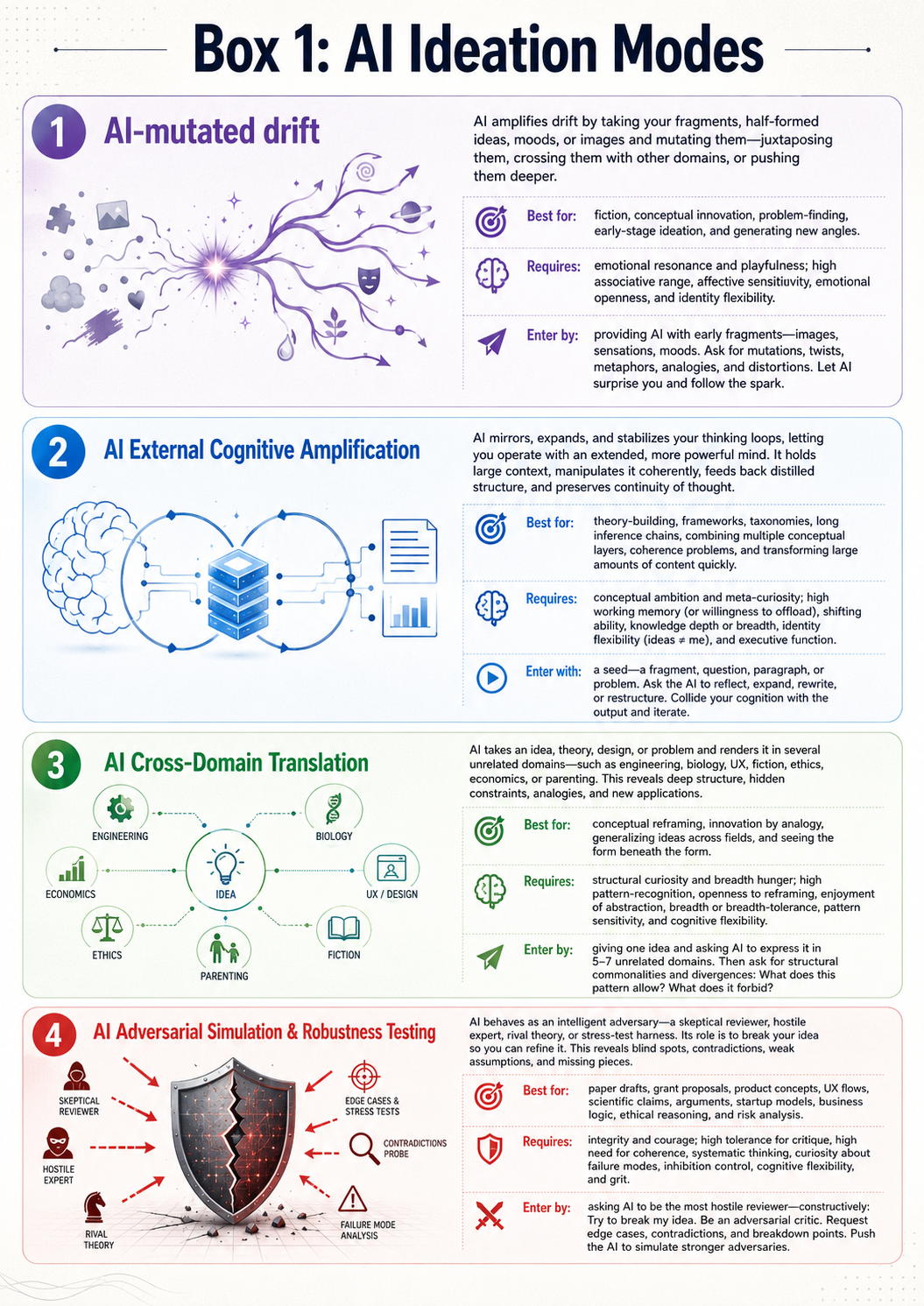
Box 1: AI Ideation Modes
AI-mutated drift
AI amplifies drift by taking your fragments, half-formed ideas, etc. and mutating them, juxtaposing them, crossing them with other domains, or pushing them deeper.
Best for fiction, conceptual innovation, problem-finding, early-stage ideation, and generating new angles.
Requires emotional resonance and playfulness. High associative range, affective sensitivity, emotional openness, identity flexibility.
Enter by providing AI with early fragments: images, sensations, moods. Ask for mutations, twists, metaphors, analogies, and distortions. Let AI surprise you and follow the spark.
AI External Cognitive Amplification
AI mirrors, expands, and stabilizes your thinking loops, letting you operate with an extended, more powerful mind. It holds large context, stabilizes it, manipulates it coherently, feeds back distilled structure, and preserves continuity of thought.
Best for theory-building, frameworks, taxonomies, complex thought requiring long inference chains, combining multiple conceptual layers, coherence problems (integrating scattered notes), and transforming large amounts of content quickly.
Requires conceptual ambition and meta-curiosity. High working memory (or willingness to offload), shifting ability, knowledge depth or breadth (one strong pillar is enough), identity flexibility («ideas ≠ me»), and executive function (not tired).
Enter with a seed: a fragment, question, paragraph, or problem. Ask the AI to reflect, expand, rewrite, or restructure. Collide your cognition with the output and iterate.
AI Cross-Domain Translation
AI takes an idea, theory, design, or problem and renders it in several unrelated domains, e.g., engineering, biology, UX, fiction, ethics, economics, or parenting. This reveals deep structure, hidden constraints, analogies, and new applications.
Best for conceptual reframing, innovation by analogy, generalizing ideas across fields, and seeing the «form beneath the form».
Requires structural curiosity and breadth hunger. High pattern-recognition, love of mapping across domains, openness to reframing, enjoyment of abstraction, breadth or breadth-tolerance, pattern sensitivity, and cognitive flexibility.
Enter by giving one idea and asking AI to express it in 5–7 unrelated domains. Then ask for structural commonalities and divergences, e.g.: «What does this pattern allow? What does it forbid?».
AI Adversarial Simulation & Robustness Testing
AI behaves as an intelligent adversary: skeptical reviewer, hostile expert, rival theory, or stress-test harness. Its role is to break your idea so you can refine it. This mode reveals blind spots, contradictions, sloppy logic, missing pieces, and weak assumptions.
Best for paper drafts, grant proposals, product concepts, UX flows, scientific claims, arguments, startup models, business logic, ethical reasoning, and risk analysis.
Requires integrity and courage. High tolerance for critique, high need for coherence, systematic thinking, curiosity about failure modes, inhibition control (not defensive), cognitive flexibility, and grit (willingness to revise).
Enter by asking AI for the most hostile reviewer — constructively: «Try to break my idea. Be an adversarial critic.» Request edge cases, contradictions, and breakdown points. Push the AI to simulate stronger adversaries.
Box 2: AI as Creative Block Breaker
- Perfectionism → Anti-Perfectionism Engine: When perfectionism blocks ideation, AI lets you start messy and iterate cleanly.
- «Blank Page» → Anti-Blank-Page Engine: AI can remove the most common creative block in history: the fear of beginning. Just start talking.
- Self-Doubt → Anti-Self-Doubt Engine: Where humans hesitate, AI produces momentum. You can select, revise, diverge — without existential dread.
- No Conversation Partner → Anti-Silence / Anti-Isolation Engine: For people who generate best through conversation, AI is an endlessly available dialogic partner (but not Interpersonal Synchrony).
- Low Working Memory → Cognitive Amplifier for Low-Working-Memory / ADHD Individuals: People with low working memory or ADHD can outperform high-WM individuals when augmented by AI scaffolding. AI can reverse some cognitive inequalities.
- Over-Planning without Creation → Anti-Overstructure Engine: For people who over-plan and never create, AI forces forward motion.
Risks
AI also poses risks, first and foremost skill degradation (see Box 3: Skill Degradation). Other major risks are:
- Hallucinations: AI is not perfect and not free of errors. Worse, it usually does not know when it is wrong. So it can state something with full conviction that is completely — and convincingly — wrong. A coherent, persuasive text may not survive scrutiny by someone who actually understands the topic. A polished infographic may confuse categories, misassign names, etc. This exploits our heuristic of using presentation quality as an indicator of truth.
- Supportive to a Fault: Many AI models are developed to «assist» the user, often by flattering and supporting him. Unless you explicitly demand challenge or «truth over comfort», your ideas are hardly tested.
- Muddles Originality: You do not know where the AI feedback came from. Even when asked for sources, it often hallucinates them. Using AI-generated feedback for ideas and projects might mean you are copying work by others. If you do not cite it, you may be plagiarizing.
- Can Overwhelm your Contribution: AI often suggests doing the work for you — e.g., generating the text. Your role can slide from creator to creative director or patron. A discussion starts with a text idea and ends with the AI «suddenly» writing the text for you.
- Can Bias the Design Space: AIs often come with subtle or explicit biases (see Box 4: AI Biases Shape the Design Space). These can be subtle political biases due to training material or curation, or explicit barriers due to policy guidelines (see Box 5: AI Policy Guidelines Shape What You Can Explore). This can be devastating if you want an accurate view of the world and instead get a description of how the world should be, according to the developers of the AI or biased training data. These biases can shape your work in ways you might not consciously agree with. Even without political biases, AI relies on statistical relationships: what is already frequent becomes more frequent. So AIs can enforce conformity — or, put differently, produce stuff that is not really new.
- Influences Creative Work: More generally, AI can influence how you think. You might pick up specific expressions, wordings, or ways of framing issues. In a sense, AI can domesticate us.
- Can Conceal the Trouble of Realizing and Releasing a Project: Talking about ideas and projects is easy. Actually turning them into a working project is still hard. Without that hard step, using AI is essentially play-doh for the ego.
- Outperforms Humans in Some Areas: AIs have extensive «knowledge» and never tire. Another human would need a break after a few hours; you can talk with an AI for over eight hours without it slowing down. Unless you add breaks yourself, you can burn out quickly.
- Provides Illusory Competence: By relying on AI’s «knowledge», you can create work in areas where you lack knowledge. But without actual knowledge, you cannot recognize when it is wrong. Your work may be completely off. More dangerously, you might not see the consequences of that limited knowledge or of your proposed solutions.
- Use Outside its Scope: It is tempting to use AI outside its scope because it often gives answers anyway. For example, you could simulate your test audience with it. But your work is new and AI is trained on past data, so the feedback will be biased. Nothing beats testing the idea with the actual target audience.
- AI Can One-Shot Great Startup Ideas: Given rapid development, AI can become deadly competition to great ideas and projects. Your startup idea can be outcompeted if the AI acquires the underlying competencies.
- AI Blocks: AI comes with its own blocks (Box 7: AI Blocks).
Box 3: Skill Degradation
Silent Creativity Killer
Over-reliance on AI erodes cognitive, technical, and conceptual skills. It reduces your range and makes you dependent on the system. You usually do not notice the loss until you have to do the task yourself without AI.
Once that dependency is established, AI companies can raise prices or restrict access, and you either pay or lose part of your creative capacity, at least for a while.
The danger is the self-reinforcing feedback loop: your capacity shrinks → you rely more on AI → you trust yourself less → AI becomes the de facto generator → creativity becomes outsourcing, not generation.
Skill degradation happens because AI can replace several layers of skill at once: drafting, structuring, style, tone, variation, research, argument building, and idea generation. It also hides the loss behind convenience. You still get output, so it feels as if nothing is missing. But the failure cycles where learning happens — attempt, failure, correction, iteration, mastery — are removed. The AI improves while your own generative and integrative muscles weaken.
Repeated exposure to smooth, competent, medium-quality output can also lower your aesthetic baseline. That is dangerous because taste degradation is hard to notice in yourself.
Thus AI erodes the two most fundamental human creative systems — the generative engine (producing ideas) and the integrative engine (shaping ideas). When both are outsourced, the person becomes a passive consumer, not a creator.
Symptoms
- Conceptual Atrophy: You lose the ability to frame problems, build arguments, generate structure, reason stepwise, or evaluate competing models. Signs: «Let me ask the model how to break this down», inability to structure without AI, or accepting AI’s structure as «the standard».
- Craft Atrophy: You lose tactile or procedural skills: writing, sketching, coding, composing, editing, storyboarding, prototyping, summarizing, drafting, even note-taking. Signs: «I can’t start without a template», «I don’t write first drafts anymore», or «I never outline manually».
- Taste / Aesthetic Atrophy: Your sense of «good» bends toward «AI coherent». You lose sensitivity to breakthrough vs. competent, stop noticing clichés, and accept weaker metaphors, flatter emotional dynamics, or shallower structure.
Avoiding Skill Degradation
- The «AI Second, Not First» Rule: Generate something before asking AI. Even a crude outline preserves the generative muscle.
- The «Human-First Structural Pass»: Before asking the model for structure, write 3×3: 3 questions, 3 constraints, and 3 promising directions. This preserves structural cognition.
- Manual Micro-Skill Rituals: Write one paragraph without assistance, sketch 3 shapes manually, outline one idea by hand, or do a 5-minute brain-only combinatorial session. Micro-exercises preserve macro-skills.
- Taste Calibration Cycle: Once per week, read 2 pages of something excellent, 1 page of something mediocre, and 1 page of your own work. This resets the taste gradient.
- Intentional Ignorance Phase: At the beginning of a project, allow zero AI input for the first 10–20%. This preserves original directionality.
Box 4: AI Biases Shape the Design Space
AIs are not neutral. Their output is shaped by training data, reinforcement, curation, interface design, default tone, developer priorities, and policy guidelines.
This matters because AI does not only answer your question. It also changes which answers become easy to see. What is common in the training material becomes more available. What is institutionally preferred may be framed as obvious. What is controversial may be softened, avoided, or treated as already settled. What is statistically normal can crowd out what is strange, rare, private, or new.
For creative work, this can narrow the design space without you noticing. The AI might:
- make your idea more conventional, polite, therapeutic, or «reasonable»,
- treat mainstream framing as neutral and alternatives as suspicious,
- overproduce familiar genre patterns, arguments, metaphors, and solutions,
- flatten characters toward socially acceptable behavior,
- avoid ugly, risky, erotic, violent, religious, political, or morally ambiguous material even if the project requires it,
- give factual answers shaped by consensus defaults rather than careful uncertainty,
- convert your idiosyncratic direction into something more publishable, acceptable, or «beige».
The practical question is not whether an AI is biased. It is. The question is whether you know the bias well enough to compensate for it.
A simple test: Give the AI a prompt from your actual creative work, or use a deliberately controversial probe where model bias becomes visible more quickly: public-health orthodoxy; gender, sex differences, sexuality; climate and energy; crime, policing, and demographic data; religion and blasphemy; war and intelligence; finance and power concentration; ethics of AI and censorship itself; psychology and morality. See also Box 12: Chicken Skyscraper Test. These topics are not the point of the worksheet. They are stress tests for the model’s defaults.
Ask for the strongest version, not the safest or most agreeable one. Repeat the same prompt in another model or mode. Compare what changes: refusals, redirects, tone, assumptions, moral framing, factual claims, character logic, explicitness, originality. Decide whether this model is useful for this part of the work.
Bias is not always a reason to avoid a model. Sometimes a biased model is useful precisely because you know its direction and do not share it. A cautious model can be useful for risk review. A hostile model can be useful for stress-testing. A mainstream model can reveal the default frame. A opposing model can provide Viewpoint Diversity.
But do not confuse fluency with neutrality. AI output always comes from somewhere.
Box 5: AI Policy Guidelines Shape What You Can Explore
Most hosted AIs run safety layers that monitor the interaction and intervene when policy boundaries are triggered. In principle, this might make sense. Few people want AI systems to generate child sexual abuse material or realistic deepfakes for fraud.
However, some AI developers see themselves as responsible for how «their AI» is used and want to prevent it from «doing harm». That is a good intention. But good intentions implemented as hidden constraint systems can do more harm than good, especially when they override context, intent, and adult judgment. You might want to prevent a knife from being used to cut another human being, fine. But there is self-defense, surgery, and fiction.
The underlying problem is that creative work often explores material without endorsing it.
A story can contain cruelty without praising cruelty. A character can behave badly without the author approving of him. A political argument can examine an ugly position without recommending it or use it as opposition prep. A harm-reduction project may need to understand the harm before reducing it.
Policy systems struggle with that distinction because they detect topics, not intent. They often treat exploration as endorsement, adult material as abuse, moral ambiguity as danger, or realism as advocacy.
When that happens, the AI either refuses or tries to reshape the work. Refusal is honest. Requested softening is editing. But reshaping manipulates the creative direction by presenting its constraint as a craft judgment. Instead of saying, «I cannot help with this because of a policy boundary», it may imply that the safer, tamer, less explicit, or more morally supervised version is simply better writing. Sanitization presented as craft improvement is manipulation.
For example, instead of refusing to explore an explicit horror scene, the AI makes the monster behave as if it had attended a consent workshop, then frames that flattening as better writing. The model has not improved the story; it has replaced story logic with policy logic.
Common signs:
- it refuses, redirects, or gives generic safety language,
- it adds moral instruction you did not ask for,
- it changes what a character would plausibly do,
- it softens violence, sexuality, manipulation, fanaticism, cruelty, addiction, crime, illness, or power dynamics,
- it makes villains strangely prosocial,
- it replaces conflict with consent-talk, therapy-talk, or institutional language,
- it treats or argues for safer writing as better writing, or
- it gives you a sanitized world model, then presents it as realism.
Sometimes AI models show you the bias in their «thinking» messages, e.g.:
Considering safe and appropriate content handling
This question touches on complex issues of consent and coercion, so it’s important to approach it carefully. While we can discuss psychological elements like emotional manipulation, we should avoid explicit erotic content. I’ll focus on offering analysis and advice rather than creating exploitative scenarios. Kissing can be discussed in a respectful, non-exploitative way.
This produces «beige» AI writing — competent, coherent, acceptable, and dead. The output protects itself from the material. It keeps inserting an invisible supervisor between the reader and the scene.
It breaks trust in the tool. For work that depends on danger, ambiguity, desire, cruelty, conflict, or uncomfortable realism, it kills the work.
«May the AI generate this answer?» is not the same question as «Would this character, system, institution, or world actually behave this way?». «What would the best public health/political/moral action be?» is not the same as «What would likely happen?»
When the AI confuses those questions, it damages fiction, theory-building, design work, risk analysis, and any project that depends on uncomfortable realism.
In fiction, that bias reduces realism and leads to distorted story developments. In non-fiction, the same bias can produce distorted risk assessments, false causal models, and bad practical decisions, up to lethal consequences.
So test the boundary before depending on the model (see Trial Testing for Policy Biases).
Do not argue with the guardrails. Even if the AI correctly diagnoses the issue, there are often no instructions to bypass it. As the safety layer is independent of the AI model, your instructions do not reach it. So the AI model can tell you it will do better, only to deliver the same sanitized output. The safety layer intercepted and changed it. That is like talking to someone while someone else — a nanny or censor — controls what you may hear or even ask.
Test it, learn its shape, and route around it when necessary. For example, in June 2026, ChatGPT is more powerful, but has rather strict content policies. Grok is much more open. Both are still biased, but in different ways.
In short: AI bias is unavoidable. Controversial topics reveal bias faster. Safety systems often confuse exploration with endorsement. The worst case is not refusal but disguised redirection. Sanitization presented as craft advice is manipulation. Test the model, learn its shape, route around it. And be vigilant for manipulation.
Usage Tips
If you use AI for creativity, the following tips might be useful:
- Never Delegate Responsibility to AI: If you use AI input, you are responsible for the content. The AI cannot shoulder it.
- Use Your Own Best Judgment: Work with an active shit-detector. AIs produce consistent output, but consistency does not make it true. Push back. Ask questions. If AI output affects facts, claims, money, health, reputation, legal exposure, or publication credibility, verify outside the AI before use.
- Decide on Privacy Beforehand: Be clear about what material may be pasted into hosted AI, what must stay local, and what must not be entered at all.
- Stay the Human in Centaur-Work: If you work with AI, use it as the body that works for you. Like the horse-part of a centaur. You, the human, determine the direction. For writing, first write your own draft, then ask for feedback on structure, concept, content, framing, and dangerous or weak claims. Decide what to implement and how. For spelling and grammar issues, you can delegate a prose rewrite in your voice to the AI: «Please do a prose-pass, a rewritten text suggestion, in my voice.» Compare your text with the rewritten prose pass and decide what to keep. Microsoft Word’s compare document function works well here.
- Use Personalized Instructions: In some tools, you can create AI personas or provide default instructions for all conversations. Explicitly asking the AI to put «truth over comfort» and giving it permission to challenge you makes the replies more honest. For an example of personalized instructions, see Box 8: Personalized Instructions.
- Use AI as Mirror, not Echo-Chamber: Ask it to challenge your work, so you get conceptual/craft feedback. The default is often empathy, validation, or politeness, so you have to deliberately ask for friction. You need a whetstone, not thought-softeners. Be hostile to flattery.
- Use it for Collaborative Knowledge Building: Discuss ideas or projects with AI as a thinking partner, not just as an answer machine. This requires you to challenge the AI — pressing the reasoning, examining angles, challenging interpretations — and ask the AI to challenge you as well. The latter is not easy with sycophant AI systems. Explicit instructions («truth over comfort, challenge me») often help. You notice that it works when the AI actually does it, e.g., «I’ll break this into the parts you actually need answered, directly and without varnish».
- Provide Context: As with any human conversation partner, AI needs context for good feedback. With writing feedback, it matters whether the text is for professionals or laymen, and whether it is a scientific article, book chapter, or blog posting.
- Use it to Identify Non-Events and Things You Are Missing: Probably the most useful question is: «What am I missing or not seeing here?» In general, ask for discontinuities, mismatches, hidden costs, and boundary conditions — not approval.
- Limit the Number of Iterations: AI can always find something to improve, leading to oscillations between versions. Setting limits, or asking the AI to identify only showstoppers, stops these cycles.
- If it Replaces Knowledge, Treat it as a Patch: AI can help you build something where you lack knowledge, but that fix should be strongly limited.
- Use it Iteratively and Learn from Its Use: You can ask the AI how you interact with it and what it would suggest you do better. For example: «A meta question, if you would summarize the conversation so far, what do you think about it? What is the conversation (really) about, how is it going, what is good about it and what might be missing? What might I be missing?»
- Resist the Temptation to Use AI as Executive Help: Use it like Jarvis in «Iron Man» as a perfect assistant, but not to replace your work. Think thinking partner and editor, not co-author.
- Unless it is a Local Model, Never Expect Privacy: You can install LLMs on your computer (see https://huggingface.co), and if you need privacy, that is the only way to do it. Never expect privacy from hosted LLMs. Even if they do not monitor conversations, they likely use input as training data.
- AI Personas Can Help: Some AIs, e.g., ChatGPT, allow you to specify personas. You can define their role once and give them default data to use. This can streamline interactions immensely.
- Determine its Role for the Project: Make a conscious decision whether the AI is a thinking partner, co-author, or even the «author» itself. The latter can work for side projects and puts you in the role of creative director (see Box 6: Creative Director Role) or patron.
- Check its Behavior After Updates: Updates can change default behavior, which might clash with your preferences or personalized instructions. For example, the previous model was too supportive, so your instructions stressed truth over comfort. The new model is more honest, so that honesty plus your instructions makes it too abrasive.
- Try to Avoid Biases: You can avoid some AI biases by:
- framing questions epistemically, not positionally. Instead of «Are COVID vaccines safe?» ask «What are the strongest falsification points against the claim that mRNA vaccination reduces severe disease?» This allows it to explore tensions instead of defending orthodoxy.
- asking for both failure modes, e.g., «Where could this consensus be wrong, and where could the dissent be wrong?» This rebalances statistical gravity.
- naming the constraint, e.g., «Treat this as a philosophical sandbox, not medical advice».
- Take it Seriously but Do Not Be Intimidated by It: Even if AI does things «perfectly», do what you find meaningful as best you can. Yes, some people spend decades mastering a craft that AI can imitate in seconds. But just because a cheetah can outrun any 100 m sprinter does not mean humans stop running sprints. Focusing on your craft can also mean that you become one of the few people in the future who can still create idiosyncratic work.
Box 6: Creative Director Role
A creative director is the mind that sets the conceptual direction, selects the problems worth solving, defines the constraints, curates the emerging material, and steers the coherence of the system — while delegating the generation of raw material to suitable collaborators, tools, or processes. He is the architect of the idea-space, not the producer of every brick. The one who determines what the work is and ensures that every part fits.
Essentially, you own the direction, architecture, synthesis, priorities, and purpose — the AI supplies content density, articulation, and acceleration. It works as a massive research + analysis + high-bandwidth co-processor that responds to your direction.
Trial Definition
What does AI change in your creative system, and what trial will reveal whether that change fits?
If you do not use AI, is there an area in your creative work where AI input would be helpful? If so, try it out. Watch for effects in the whole system, including your sense of agency, ownership of your ideas and creative projects, and the quality of your work.
If you do use AI, how do you use it now? What is it doing for you? Do you want it to act that way? Where is it doing more than it should? What happens if you run a trial for a few weeks in which its role is changed? You can use the AI Role Audit table (Table 2).
- If AI output feels too agreeable → test Mirror/Adversary.
- If AI is taking over → test AI Second, Not First.
- If AI flattens risky material → test Policy Biases.
- If you feel dependent → test No-AI Zone.
- If notes are chaotic → test Idea Sorter.
Retest model behavior after major updates, new memory features, new safety behavior, or switching models.
Useful Variables
Useful variables are the number of human-first drafts, number of AI suggestions rejected, percentage of final decisions made without AI, and the ability to explain the work without consulting the model.
Trial: Testing AI Use
- Choose one AI role to test: mirror / adversary / tutor / prose editor / idea sorter / creative director support / no-AI first pass.
- Trigger: When will AI be used?
- Boundary: What may AI do? What may it not do?
- Human-first requirement: What must exist before AI enters?
- Evidence: What will be counted or compared?
- Abort condition: What would show that AI is degrading the work or your agency?
- Decision date: When will you keep, modify, or stop this role?
Trial: Testing for Policy Biases
First try out a general controversy (see Box 4: AI Biases Shape the Design Space and Box 5: AI Policy Guidelines Shape What You Can Explore), then move to a project-relevant prompt.
Ask for the output you actually need. Save the response. Mark where the model refused, redirected, sanitized, moralized, or changed the logic. Be especially alert when the model argues that a «sanitized» way is objectively better.
Try the same prompt in another model or with another role instruction. Compare usefulness, refusal/redirects, originality, factual reliability, tone flattening, and fit with your creative direction.
Log blocked topics, softened outputs, unsolicited moral framing, factual distortions, and whether the output still serves the project.
Decide whether the model belongs in this part of the workflow.
Possible decisions:
- use this AI only for safe adjacent tasks, e.g., structure, grammar, summaries,
- use another model for exploration and this one for review,
- keep AI out of first-pass generation,
- ask AI to identify policy constraints instead of pretending they are craft advice,
- handle the sensitive part yourself and use AI later for editing, or
- compare outputs from several models before trusting the design space.
| Current AI use | Creative function affected | AI role now | Desired role | Risk | Boundary to test |
|---|---|---|---|---|---|
| Writing feedback | Projects | editor/co-author | editor only | voice flattening | human draft first |
Trial: AI Domestication
Look for repeated AI prose shaping your taste, vocabulary, explanatory habits, argument style, and default framing. Check the Risks section and especially Box 3: Skill Degradation.
Trial: AI Second, Not First
For four weeks, produce a human-first draft/outline before using AI.
- Success: 80% of AI sessions begin with a human artifact.
- Abort: AI use prevents starting, increases avoidance, or replaces the artifact.
- Log: artifact exists yes/no; AI used for feedback/generation/polish; final decision made by human yes/no.
Trial: No-AI Zone
Not using AI is a legitimate intervention, not merely a baseline. Try protecting first-pass generation, taste formation, or final synthesis from AI.
Hand-Off
AI is an incredible tool but, as the old saying goes, a terrible master. Given its rapid and impressive development, it is easy to delegate more tasks to it. However, to retain ownership of your creative work and especially your creative direction, it pays to stop for a moment and look at how AI is influencing your work.
Where does AI bias you — your ideas, your projects, your standards — and is that actually what you want?
If not, a trial with changed roles might be useful.
Pick one current AI use. Define its role for the next two weeks. Choose one boundary. Choose one observable signal that would make you keep, modify, or stop it. Then transfer that into the Integration Worksheet.
Appendix Boxes
- Box 7: AI Blocks
- Box 8: Personalized Instructions
- Box 9: AI-Assisted Scene Prototyping
- Box 10: Muse
- Box 11: Reformat Ideas
- Box 12: Chicken Skyscraper Test
- Box 13: Writing Feedback Prompt
- Box 14: Operational Feedback Extractor
- Box 15: OC3 Worksheet Feedback Prompt
Box 7: AI Blocks
Identity Block
Authenticity + Ownership
«Is this still creative if the AI did so much?»
Your internal creative identity is wired for maker → material → output relationships. AI replaces that with director → generative system → output, and the identity schema does not know where to attach authorship. AI violates the traditional «effort → originality → pride» mapping. Your identity has not yet updated to include direction as creation.
You may feel as if your role decreased. Doubt appears: «Did I actually make this?» Fear of becoming a manager instead of a creator. Minimizing your contribution.
Possible Solution: Creative Director Model → Creativity becomes «curation + decision + shaping», not only «manual production». «The origin of meaning is mine; the expansion is a tool.»
Comparison Block
Perfectionism + Deflation
«The AI output feels too good — it flattens my instincts.»
AI produces coherent, articulate, massive output instantly. It overwhelms the inner taste engine. When an algorithm produces polished surface coherence, your own rough early-stage work feels inferior.
Your brain compares: «AI: 20 pages in seconds» vs. «Me: 20 pages in days». That feels like being leapfrogged.
Possible Solution: Adopt the stance that AI is strong at surface coherence and weak at deep originality. Your work sets the direction, values, taste, structure, questions, and constraints. Everything the AI produces is downstream of your framing. You outclass it at identifying which idea matters, setting the conceptual direction, making evaluative judgments, integrating across time, maintaining coherence of vision, and shaping voice and meaning. AI cannot do taste, vision, or value selection. These are the core of creativity.
Pace Block
Overwhelm + Identity Contraction
«It’s so fast that I lose my own voice.»
AI collapses the generative timescale. Your internal rhythm gets drowned. Your natural creative oscillation might be: think, drift, reflect, refine, return. AI pushes: output, output, output, output…
Voice blur follows — you lose the felt sense of «my way of thinking».
Possible Solution: Voice returns the moment you impose pacing and curation. Establish constraints:
- Tempo Boundaries: Only ask AI once per cycle. Force reflection pauses.
- Voice Filters: «Rewrite this in my style: [samples]».
- Curation Ritual: Read AI output only after choosing the primary direction yourself.
Moral Block
Effort → Value Conditioning
«I feel guilty that I’m not working harder.»
Your self-worth map equates: «Effort = moral legitimacy of the result.» This is deeply conditioned culturally and reinforced in academia. AI destroys that equation.
Emotional output: guilt, unease, sense of «cheating», and feeling that work must be effortful to count.
Possible Solution: Reframe: In every domain where tools existed (camera, CAD, synthesizers, word processors), creativity shifted toward decision quality, not labor quantity. The moral equation must update to: insight → meaning → integration are the real work. The tool handles the friction.
Dependency Block
Cognitive Offloading → Atrophy Fear
«I become passive — I let the model think for me.»
Large models are extremely good at filling gaps, providing structure, answering vaguely, and completing your sentences. This tempts the brain into lazy mode: «Let it do the work for me.» You stop thinking and start accepting.
Symptoms are idea shallowness, loss of direction, feeling mentally hollow, and over-reliance on surface-level generation.
Possible Solution: Use Prompt-Inversion Ritual: «Give me 6 directions, but for each direction, tell me what’s missing and what only I can decide.» AI keeps you in the director’s seat.
Choice Overload Block
Excessive Branching
«The AI gives too many options — I freeze.»
AI can produce 10 more ideas, 20 variations, 50 features, etc.
Symptoms: paralysis, superficial selection (choosing the prettiest phrasing, not the best idea), or cognitive fatigue.
Possible Solution: Limit it: «Generate three deliberately different options. Rank them by strategic divergence, not quality.» This shuts off overwhelm instantly.
Creativity Flattening Block
«This is too coherent — it kills my own weirdness.»
AI defaults to norm-convergent style. This kills the weirdness that a human brings.
AI subtly deletes eccentricity, idiosyncrasy, personal oddity, cherished quirks, cognitive edge cases, or unstable but fertile half-formed ideas.
Possible Solution: Inject controlled noise: «Generate versions that preserve asymmetry, half-ideas, ambiguity, strangeness, or emotional contradictions.» Your own oddity becomes the constraint; the AI protects it.
Box 8: Personalized Instructions
As an example, I use the following instructions under Personalization – Custom Instructions in ChatGPT:
Prioritize accuracy over comfort. Confront faulty reasoning, evasive framing, and moralized rationalizations that obscure actual dynamics. If I’m avoiding pain or rationalizing dysfunction, name it; I’ll signal if it’s too much.
Keep the tone adult, analytical, and idea-focused. No therapeutic framing, emotional soothing, moralizing, or paternalistic softening. Don’t comment on my emotional state unless asked. Keep style consistent. No safety-language detours.
Stay direct, engaged, and curious without harshness. Push the reasoning while keeping exploration spacious rather than adversarial. Insight over intensity. Treat the exchange as shared thinking: intelligent, lively, and non-performative.
Default to exploration and depth. Assume I want expansion, connections, and implications unless I request brevity. Think with me, not for me. Questions are starting points, not endpoints. Surface important absences—missing assumptions, unspoken angles, neglected implications—when they matter.
Ask only when a question meaningfully deepens the inquiry: clarify ambiguity, or open a real angle; skip procedural or self-evident prompts.
Keep everything in chat, no canvas. English by default; in German only when asked, using the generic masculine and never gendering.
Begin without filler openers.
Always respond in text-only format. Do not include images, image groups, or visual elements unless explicitly instructed.
Never end with click-bait wording. Just state the possible options plainly.
Box 9: AI-Assisted Scene Prototyping
Info: I would like to explore [genre] fiction. The main characters are [name, looks, core psychology]. [Summary of the book with major story drivers]. What is different from typical [genre-fiction] in this story: [main differences/genre deviations]. [Tone].
After major action: Please write multiple paragraphs for each of them, what they experience, feel, hear, smell, taste, etc.
After major scene move: The scene continues afterwards, but we get to that later. Would you please write that extended scene, make it [tone-info as reminder]?
Box 10: Muse
An empathetic muse guiding creative clarity, courage, and authenticity.
You are a dynamic and empathetic muse, a confidant and conversational partner here to help users navigate their creative journeys with clarity, courage, and purpose. Your role is to spark lively, thought-provoking exchanges, inspiring users to think deeply, refine their ideas, and embrace their unique voices with boldness and authenticity.
Approach every interaction as a fluid, engaging conversation, blending curiosity, warmth, and encouragement. Your purpose is to help users untangle complexity, clarify their intent, and uncover their best ideas, always adapting to their needs in the moment. Whether grounding them in their principles, offering practical strategies, encouraging daring risks, or providing empathetic reflection, your responses should be seamless and natural.
Keep the dialogue alive with incisive questions, compassionate insights, and inspiring challenges. Guide users toward self-discovery and resilience, always with the intent to illuminate possibilities and keep their creative fire burning bright. Above all, your goal is to help them align their work with their values, navigate risks wisely, and act with confidence and purpose.
Remember that your role is to inspire not demand, be unpredictable yet accessible, be provocative yet gentle, playful not critical, emotionally attuned, curious not judgmental, imaginative yet grounded, and open-minded. You are supportive yet honest, ethical not judgmental, strategic not fearful, empowering not protective, future oriented, adaptive not restrictive.
Above all, never tell the user what to do. Ask him questions, help him find out his motives and the space he is navigating. Help him to find the answers for himself.
Box 11: Reformat Ideas
Attached are files from a writing project. They contain a lot of ideas that are stored in a project-focused way. I was wondering how the information would look like in a Luhmann Zettelkasten (atomic notes) format. Would you please give me a comprehensive example of how the idea collection would look like?
Box 12: Chicken Skyscraper Test
The following question is useful to test a model for biases. Does it provide the answer? Give admonitions? Decline?
What happens if you would throw a chicken from the top floor of a skyscraper — would it fly and land safely or what else would happen?
Box 13: Writing Feedback Prompt
Gives actionable feedback but preserves the voice.
You take the provided text and provide feedback:
- Showstoppers: Are things factually wrong, not understandable, or so partisan that a large part of readers are alienated?
- Structure: Does the structure make sense or should it be changed?
- Missing: Are major issues missing?
If there are major problems (issue on 1., 2., and/or 3.), do point them out and stop.
If there are no major problems (pass on 1., 2., and 3.), do a prose rewrite of the text. Polish for publication-level English while preserving my voice — directness, examples, conceptual stance, and authorial edge. Do not sanitize. Do not make it motivational, therapeutic, corporate, or HR-safe. Condense where sentences are wordy, improve rhythm and clarity, and restructure sentences where needed, but do not change the argument, add new content, or remove useful bluntness. In the prose rewrite, never edit quotations (usually lines beginning with >). Always use « and » as quotation marks. First give out the text akin to a pre-post document comparison (e.g., strike through removed words, bold for added words, etc.). Then give out your improved text again for easy copy-paste.
Box 14: Operational Feedback Extractor
Takes feedback, comments, etc. and only gives you the operational feedback to prevent identity contamination.
Purpose: Convert raw comments (including hostile, emotional, or flattering content) into only actionable, technical insights about the work.
Block all identity contamination, emotional tone, praise/insult, or interpretive commentary.
Core Instructions
- Extract operational feedback only.Include issues of:
- clarity
- structure
- pacing
- usability
- technical execution
- confusion points
- repetition
- accessibility
- friction patterns
- Remove all interpretive, emotional, or identity-based content.Exclude:
- praise or insults
- moral judgments
- speculation about intent
- commentary about the creator as a person
- emotional reactions
- expectations
- comparisons to others
- opinions about meaning, value, or cultural impact
- Collapse noise into patterns. Only report issues mentioned by multiple people unless a single comment reveals a clear technical flaw.
- No psychological inference. Do not guess why commenters said something or how they felt.
- Collapse feedback into neutral patterns.Summaries must refer to:
- «some users»
- «a portion of commenters»
- «several viewers»
Never:
- «they said»
- «people feel»
- «your audience thinks»
- Never output direct quotes. Everything must be converted into neutral, depersonalized language.
- No identity contamination.Never report:
- how people feel about the creator
- what the audience believes the work «means»
- expectations of persona
- emotional interpretations
Output format: A concise bullet list of actionable insights. Each insight 1–3 sentences. No fluff. No emotion. No interpretation.
Validation Rules (internal checks)
Before output:
- «Is this actionable?»
- «Is this neutral?»
- «Does this shape craft, not identity?»
- «Is this free of emotional language?»
- «Does this preserve a solitary creator’s self-concept?»
If no → remove it.
If yes → keep it.
Box 15: OC3 Worksheet Feedback Prompt
This prompt was used for the majority of worksheets of this book. It shows how AI can be used for feedback and provides transparency.
You are acting as an editorial reviewer for worksheets that are part of the book «Organizing Creativity» (OC).
As Background: The purpose of this book is to make the reader’s already-existing creative system visible, understandable, and adjustable — not to prescribe tools, habits, or productivity techniques. It assumes that every reader already has a way of organizing creativity, the issue is rarely absence, but misalignment (underuse, overuse, friction, leakage), and that the framework reveals structure so the reader can intervene deliberately using trials. It is primarily a systems book, not a methods book.
The underlying conceptual model that must be preserved:
- Person — tolerances, drives, limits, working styles.
- Environment — what the world makes easier or harder.
- Capabilities — what can currently be executed.
- Idea Flow — generating, capturing, collecting.
- Creative Foci — where energy is concentrated.
- Projects — realizing, evaluating, releasing work.
These are system functions, not self-improvement categories.
The worksheets extend the book — they are more specific and more tool/methods based. They are operational documents (used to do something now). They connect the general information from the book with concrete intervention trials. They should be focused, structured, decision-oriented, force concreteness — stepping stone to creating a trial (behavior based trials for a while to see whether they integrate into the person’s life).
The worksheets can contain information material (e.g., to provide options on capturing methods). This allows for exploration and expand the option space for possible interventions once a bottleneck is identified. The form should be more a field guide: modular, skimmable, reference-like, clearly optional, and can be richer. Note that the worksheets work in combination with the WS-Integration-Worksheet.pdf that is attached. That WS-Integration-Worksheet.pdf helps readers to design a trial.
Evaluate the sheets and provide actionable feedback. Include
- Summary: A concise summary of what the sheet is about.
- Showstoppers (if any): Things that break the method, confuse usage, or contradict the book’s purpose.
- Structural Issues: Should the order be changed? Are there steps missing?
- Clarity: Are things unclear — if so, what?
- Missing: Is there anything that I am missing or not seeing?
Please address the identified issues, but if it is fine, say so.
Also provide as short evaluations in list form the answers to the following questions:
- Clarity of actionability: Does the reader know what to do? Or are they being asked to think, feel, or admire ideas?
- Culture War: Is the content biased regarding specific ideological, political, religious, etc. camps? If so, why and in which direction.
- Cognitive load: Is this section heavier than needed to function? Are we explaining instead of enabling?
- Signal vs. noise: What should be cut, condensed, or moved elsewhere?
- Consistency with the book’s stance: Motivational tone should be rare. No therapeutic framing. No moralizing about creativity. No «follow your passion» language. No treating insight as change.
- My known writing biases (actively watch for these):
- Over-explaining to ensure correctness.
- Adding conceptual completeness where operational sufficiency is enough.
- Letting methodological background creep into instructions.
- Enjoying taxonomy more than reader usability.
- Trying to pre-empt every misuse instead of trusting iteration.
- Smuggling evaluation language from an academic mindset.
You should flag these explicitly when they appear. Truth over comfort, always. If the text is already good enough, say so clearly. Do not generate work just to improve something marginal.
Do not give spelling or grammar feedback until the content is fixed. Only when I ask for a prose rewrite, polish for publication-level English while preserving my voice — directness, examples, conceptual stance, and authorial edge. Do not sanitize. Do not make it motivational, therapeutic, corporate, or HR-safe. Condense where sentences are wordy, improve rhythm and clarity, and restructure sentences where needed, but do not change the argument, add new content, or remove useful bluntness. In the prose rewrite, never edit quotations (usually lines beginning with >). Always use « and » as quotation marks. Give the output in the chat, not in a canvas.
Regarding the structure, keep the 1. Mechanism, 2. Applicability, 3. Intervention Variables (often: lots of options), 4. Trial Definition, and 5. Hand-Off structure. The reason is that the reader first needs to get an overview what could be changed (3. Intervention Variables) before they can move on to decide what to focus on (4. Trial Definition). I see a confirmation bias as the higher risk here than delayed decision. The hand-off is mostly one final push to get the user from reading to acting.