«If it ain’t complete and you don’t trust it, you won’t use it.»
David Allen
Generated and captured ideas end up somewhere. Some people try to remember them, or leave them in the capture tool, e.g., pages in an idea journal or notes app. Others have a drawer full of paper scraps, a collection of files and folders, specialized software, or some other dedicated system. The question is not whether you have a collection, but how well it supports the realization of creative projects.
A working collection that stores ideas in a usable, structured fashion is a living system — not a graveyard.
It ensures that ideas remain available when needed. Collected ideas also act as crystallization grains around which related ideas accumulate. Quantity improves — in the form of more ideas and information. Quality improves — in the form of structural changes, elaboration, and iterative idea cycles. Ideas and projects grow and connect until they reach «critical mass»1 and can be realized as creative projects. This makes even large and complex projects possible.
An idea collection does not need to be complicated or heavily designed in advance. On the contrary, people can get lost easily in creating collections (see Collecting Becomes the Focus on page 141). In its minimalist form, a collection is simply a storage of ideas that lets you find material quickly and easily — for example, an artist collecting stimulating material in a folder. Depending on the domain, collections can become more complex, e.g., for scientists who need accurate citation. But they remain in the service of enabling creative projects.
There are functional differences between capturing as temporary intake, collecting as a long-term working repository, project workspaces or production tools where realization happens, and archives or asset stores where bulky or finished material lives.
Before commitment to realize a specific project (see Cre-ative Commitment on page 177), ideas and possible projects should grow in the collection. After commitment, production tools may take over.
For example, you might have a project idea for a book. If you move into writing tools too early and start developing content there, new ideas are stored outside the collection. If you later decide to realize a different project, those ideas are effectively lost to other work. Worse, you become dependent on another application that may not remain usable in the future.
Content of the Collection
Collections need to handle ideas, and often project pages and connections between entries.
- Idea Pages: Short notes, usually with references to similar or opposing ideas. Collecting ideas does not mean the entries are tidy or complete. Entries can be fragments, questions, emotional impressions, problem formulations, associative-drift debris, structural ideas, contradictions, constraints, partial scenes, half-solutions, insight clusters, breakthroughs, methods discovered on the fly, and much more. The collection simply has to make that material accessible.
- Project Pages: More structured entries, often extending over multiple pages. For example, a dissertation page can include todos, thesis outline, literature to get, reminders, issues to discuss with the advisor, things to remember for the defense, outlines for papers to publish, notes on technology used, future research ideas, grant ideas, etc.
- Connections: Whether it is a handwritten «see card xyz» or a digital link, meaningful connections make the collection more manageable. For Network and Hybrid types (see Collection Types on page 132), they are essential. There is no need to force them, however. Some connections are obvious, others become visible only after repeated movement between entries. Occasional review of the collection helps to remind you of available material and reveals emerging links.
Other content relevant to creative work can also be stored in the collection, as long as it directly supports ideas and projects:
- Cold Storage: Ideas or possible projects that are distracting. For example, ideas that go nowhere but drain attention and energy, or zombie projects you had to actively kill. Stored in a separate, less salient part of the collection, e.g., not listed in overviews in a digital collection, they are no longer active and are removed from ideation. The material is not deleted as it might still inspire future work or might get reactivated when things change, but its removal from the live system restores clarity and flow.
- Sanctuary: Ideas or possible projects that are serious and valuable, but do not fit with the current creative direction. They are stored separately to prevent them from interfering with daily practice (see Creative Finitude and Limits on page 156).
- Sources: Material that is not your own work, but is useful as foundation or inspiration. This can include extracts from articles or books, texts, images, excellent or terrible solutions, newspaper clippings, poems, music tracks, and much more. These entries should clearly indicate that the material is not yours and ideally include the actual source information. Even if you think you could never confuse it with your own work, that can change as your skills and interests evolve. An «I could never do something like this.» can quickly turn to «Did I do that or did someone else come up with it?»
- Skills and Topics Information: Notes on domains you are interested in, ideally with clear structure. For example, learning notes on a programming language, including sources if needed for citation.
- Someday List: Everything that cannot be realized now, but should not be forgotten. A «Someday List» can relieve pressure to do the other project immediately (see also Creative Energy on page 165).
- Archive of Realized Projects: Having the final version of completed projects easily available can be motivating and useful for sharing. To keep the collection lean, creation material and earlier versions are usually better kept in a separate archive or asset store.
Other content may work as well — for example personal information, diary entries, or contact information. It can even encourage more frequent interaction with the collection. But it can also lead to the failure mode of Using the Col-lection for Everything (see page 143).
Collection Types
Depending on how a collection is structured, it directs attention and idea growth differently (see Figure 10).
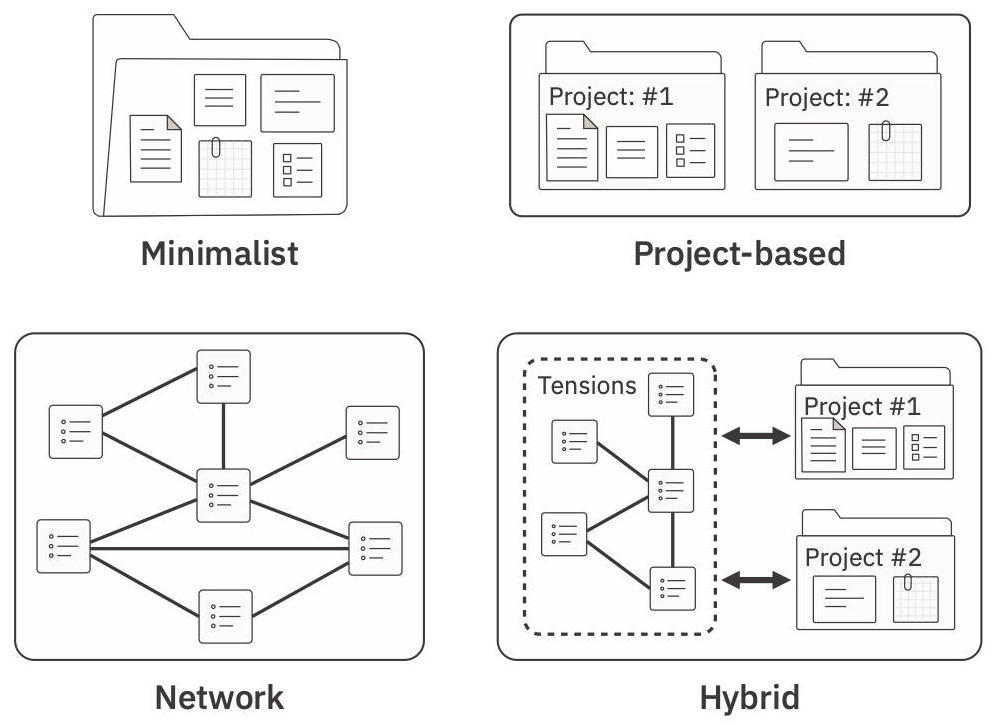
Figure 10: Collection Types.
Different centers of gravity produce different growth patterns:
- Minimalist (emergent): A simple collection, e.g., files and folders with light annotation. Regular reviews prevent mutation into an idea drawer and regular pruning reduces noise. It has no center of gravity, so its growth pattern is emergent and undirected — patterns emerge through recurrence and review. They work best for people who are just starting to collect ideas and those who need a light repository, e.g., painters collecting inspirations and sketches.
- Project (objects): Projects organize the collection, e.g., folders by domain, project pages with ideas stored within projects. Optional files for unassigned ideas, e.g., collection pages for various ideas that could turn into projects. Projects are the center of gravity — the sustained engagement with a live problem inside a project leads to their growth by accumulating ideas. They work best for artifact creators, narrative thinkers, and builders who think in projects, e.g., books or papers.
- Network (ideas): Idea-focused collections with one idea per note, high granularity, and dense linking. Projects are temporary constellations. Luhmann’s «Zettelkasten» is an example of this type of collection. Growth occurs in its network-density, the links between entries, which also shapes the structure through its interconnections. They work best for people who think in connected ideas, especially abstract or conceptual work built over decades, e.g., theory, cross-domain synthesis, and reuse of ideas.
- Hybrid (tensions): Combines network-based and project-based structure. Concept areas for recurring structural nodes or tensions, e.g., repeated themes or questions, with project pages as case studies that explore and express these tensions iteratively. Growth occurs in tensions, which persist across projects and ensure continuity, and in projects, which provide momentum and a finishing bias. Both tensions and projects stimulate each other. They work best for people who think in projects but have recurring themes that outlive individual projects, e.g., writers, essayists, cross-domain thinkers, or structurally minded artifact producers.
The question is not which type of collection a person wants, but which one works best for their creative work. More organization is not always better — many excellent creators operate with minimal structure. The test is whether the system produces finished, usable output.
Some collection types are intellectually seductive. The network type («Zettelkasten»), for example, promises structural mastery, systemic coherence, and future-proof ideas. And that can be powerful for theories, frameworks, models, and structural observations. Someone doing conceptual work may find the other collections too concrete, like caging a swarm of birds.
However, someone who thinks in projects may lose their center of gravity in a network system — ideas become stars in the distance and nothing pulls them anywhere. Someone who only needs a light collection will often be distracted by anything much more elaborate than a minimalist one. For hybrid thinkers, the interplay between project structure and networks is often what makes the system work — either one alone may be insufficient.
Thus, the structure of the collection has to support creativity by directing incoming ideas to the right place to grow — emergent, project-based, connected, or hybrid.
Working Functionality
The collection must both support immediate and long-term use.
Growth, Change, and Retrieval
A good collection supports the deliberate creation of things that are new and useful. That function comes first. The collection is not itself a creative project, though treating it as one is a common failure mode (see Collecting Becomes the Focus on page 141).
This means the collection must:
- Allow frictionless growth: The structure should support rather than strangle the collection. It should be easy to add information in the right place (e.g., creating pages, using templates), change it (e.g., editing, renaming), restructure it (e.g., associating ideas with a specific project), and make connections between ideas or projects (cross-references, links). Ideally, entries stimulate further ideas.
- Enable effortless retrieval: Navigating to information or finding it through search should be at least as easy as entering it. Multiple entry points should exist, e.g., tables of contents, index pages, bookmarks, searches, graph views, or tags. If entering is easy but retrieval is not, the Collection Becomes an Idea Dump (see page 141).
- Be flexible regarding content: Relevant information can take the form of text, images, audio, video, and more. These should be handled with low organizational overhead. For example, the system should not make file naming collisions or storage location a constant problem.2 If physical objects are included, referencing them should also be easy.
- Be adaptable: Some adaptability is usually needed to make the system fit personal requirements. For digital collections, this might include themes, plugins, or colors. For analog collections, color, post-its, and other simple conventions can help.
- Enable serendipity: The collection should have enough presence to invite browsing and remind you of ideas and projects. This makes serendipitous connections more likely.
Long-Term Usability
A creative project may not be worked on for years, and its realization may also take years. Unlike capture, the collection therefore has to support long-term use.
- Trust: If a collection is not trustworthy — in the sense that it remains available and continues to function reliably — then everything invested in it is at risk. The result is that it will not really be used. That trust, however, has to be justified in practice, in actual use.
- Long-term ease of use: Friction may come from the work itself or from your standards, but it should not come from the tool. The collection must remain easy to use even as it grows. Slow loading, sluggish search, or awkward navigation become serious problems in large collections. The attraction of a new solution can also hide problems that make long-term use aversive. Look and feel can matter as a secondary factor — liking the system makes regular use more likely.
- Long-term availability: Will the collection still be accessible and usable in ten or twenty years? This matters especially for digital systems. Who controls the data? Can it be exported? If the software disappears and the format is proprietary, access may be lost.3 This makes cloud-only systems, subscription dependencies, and data islands, which prevent export of data, significant risks. A digital solution that uses freely readable file formats is much safer, e.g., markdown files and ordinary media files stored in folders. With some software, bugs and crashes become more likely as the collection grows, so it is worth checking how users with large collections fare.
- Backups (protection against loss): Ideas are often not reproducible. User error, software error, hardware failure, loss, fire, or water damage can wipe out a collection. Backups therefore have to be easy and mostly automatic. This also applies to analog collections, which can at least be photographed or scanned occasionally. Good backup practice means saving early, often, externally (other physical locations), incrementally, and retaining older versions. Sync is not backup — a mistake syncs just as easily as correct content. In case of physical loss, visible return information increases the chance of recovery.4 See also the supplemental materials.
- Access control / encryption (protection against theft or abuse): If the collection does not feel reasonably private, it becomes difficult to write openly and to avoid self-censorship. Encryption can help, though the usual risk is locking yourself out. Privacy is especially relevant with cloud-based systems, where companies may analyze the content of «their» cloud.
Collection Inbox
Captured ideas need to enter the collection quickly (see Con-nection to Idea Collection on page 121). Because both huge backlogs and constant individual entry are demotivating, a Collection Inbox can function as a buffer. It reduces the friction of adding ideas to the collection.
Whatever the capture method — notepads, task manager apps, audio notes, text files on a computer — all captured information is funneled into one specific location. For an analog collection that might be a single physical box. For a digital collection it might be one text file and one folder for media, e.g., images, videos, and audio files. This preserves freedom at the point of capture because there is never any doubt where the material goes next.
The Collection Inbox then makes batch processing possible. Instead of spending small amounts of time almost every day on entry, you can set aside a regular block, e.g., once per week, and process the inbox in one go. Pre-sorting the material also helps, because you can then open a relevant page in the collection once and add all associated content at the same time.
In a digital collection, including the inbox in the backup process also protects ideas that have been captured but not yet fully entered. This includes ideas captured on paper and then photographed, or paper and audio notes that were transcribed manually, by OCR, or with speech-to-text software.
Starting a New Collection
If you have used your mind as an idea collection so far, or want to start a new one, the following points may help.
Tools for Collections
There are many options for collections, from simple files and folders to specialized software. Because tools change frequently — companies fold, products appear and disappear — an overview is in the supplemental materials.
In general, digital tools are more flexible, easier to change, and much easier to back up. Paper-based collections can still work, e.g., notebooks, ring binders, or index cards. Luhmann’s Zettelkasten was on paper, after all.
What matters is what you can create with the tool. Avoid looking for the perfect collection method. That search never ends, because you change, your work changes, and tools change. It usually just delays actual creation (see also Tools on page 89).
Starting
If you start a new collection, it might be useful to begin Minimalist — a simple folder, a small set of categories, and a weekly ritual for moving captured ideas into the collection.
That is enough to begin, and as long as the content remains changeable, nothing important is foreclosed. Momentum beats architecture and behavioral feedback beats an elegant collection that works only in theory.
Some chaos at the beginning is normal. The collection has to grow before its structure becomes clear. Skim it from time to time and see which topics, projects, or idea clusters increase. Over time, the need for more specific structure becomes apparent.
You will learn what you need, which kinds of projects profit from which structure, and which tool fits best. For example, you might go from Minimalist to Project to Hybrid to Network, or from Network to Hybrid to Project. More abstract systems often become useful once ideas begin to outlive individual projects or themes recur across projects.
If you already use a collection or have a huge backlog of captured ideas, it is often better to begin by adding new ideas to the new collection. That way you start with hot material, and older ideas can be added gradually during droughts. But if you change collections, commit fully and migrate all relevant material. Otherwise you end up with several half-used collections, and distributing ideas and projects across them makes realization much harder.
In general, having one collection is recommended. It allows Serendipitous Collisions across domains and provides a single source of truth when entries overlap. Separate collections may become necessary when privacy or legal constraints demand it (e.g., NDAs). In some cases, a separate project-specific collection may also make sense once a project is fully committed and enters intensive work, with little expectation that its insights will matter elsewhere.5
Growth of the Collection
At first, structure is light because there is not yet enough material to justify much organization. As ideas accumulate, recurring themes, projects, and problem types become visible. At that point, structure begins to emerge from the content rather than being imposed in advance.
Over time, a good collection becomes more than storage. It preserves ideas, makes them retrievable, shows patterns across entries, and allows older material to combine with newer material. This makes it easier to notice clusters, recurring themes, and possible projects. In that sense, a mature collection does not merely hold ideas — it supports recall, recombination, and development.
If the collection continues to grow well, it begins to reduce cognitive load. You no longer need to remember everything yourself, and returning to previous material can generate new connections, highlight gaps, and reveal which ideas are gaining enough weight to become projects.
The value of the collection is therefore how well it supports ongoing creative work.
Common Failure Modes of Collecting Ideas
Four common failure modes are that the collection becomes the focus, becomes an idea dump, becomes dead weight, or is used for everything.
Collecting Becomes the Focus
Collecting can be enjoyable in itself — many hobbies are built around it. It is easy to become enamored with collecting ideas and stop using them to realize projects.
Red flags are spending large amounts of time «improving» the collection, decorating it, endlessly adjusting formatting, and similar activities. A collection may look beautiful and should work efficiently, but its value lies in enabling creative projects.
That means ideas flow into it and are then used in projects that are actually realized. The collection itself is only a means to that end.
Collection Becomes an Idea Dump
Ideas have to be added quickly, but also in the right place and in a form that future-you can understand. And they must be retrievable. Otherwise the collection becomes an idea dump — an idea drawer full of unused notes in a different form.
The test is whether the collection has clear structure and understandable entries. If it contains only heaps of ideas without structure, or worse, undecipherable notes, it cannot support project growth.
Often this means writing more clearly, adding context, and making connections between entries. Material from other people also needs source information. Even «unknown source» is better than later mistaking someone else’s work for your own. Consistent formatting can help orientation, which is why templates for ideas and projects are often useful.
Unlike capture, a collection also needs some quality control. Some material only adds noise or dead weight. In those cases, discarding it or sending it directly to cold storage keeps the collection functional.
Collection Becomes Dead Weight
Collections grow and evolve. Not all growth leads to successful projects, and not all ideas turn out useful. So collections accumulate dead weight (see also System Drag on page 30). Without occasional curation or restructuring, they become unwieldy, sluggish, and aversive to use.
Curation can include splitting entries that grew too large, joining similar entries, connecting related entries, creating higher-order entries (e.g., hub or index pages), or updating structural information such as tags.
Some content may also be removed because it has become clutter. But it may still become useful later or stimulate better ideas. Moving it into a separate area, e.g., archive pages, cold storage, that is not searched or used by default preserves it without slowing down the main collection.
How often cleanup is needed depends on discipline, the way ideas develop, and which connections become visible over time.
Using the Collection for Everything
A collection can often hold other information relevant to creative work (see Content of the Collection on page 130). But it is not a hard drive replacement or universal storage system. If everything goes into it, creative energy dissipates across too many unrelated entries.6
Large reference or asset collections are usually better stored outside the idea collection, e.g., differentiating between all articles or books you have and those you have actually read, and storing only the latter in the collection.
Huge numbers of entries and large files clog the system, make search less useful, and make backups cumbersome. If needed, selected smaller images or links to particular assets can still be included inside the collection.
Underflow, Optimal Flow, and Overflow
With idea collections, underflows usually mean failing to make use of the advantages a good collection can provide (see Table 14).
| Aspect | Underflow | Optimal Flow | Overflow |
|---|---|---|---|
| Handling Ideas, Projects and Connections | collection not suited for ideas, projects, or making connections | collection is content-agnostic and links can be created easily | high overhead, e.g., pages need too much metadata or links are hard to create |
| Collection Type | ignoring structural effects on the collection, leading to accidental growth | let structure emerge first, then shape the collection to support growth | forcing content into an unsuitable structure |
| Growth, Change, and Retrieval | growth too difficult (e.g., space limited, changes cumbersome) | collection supports the functions well, tool fades into the background, focus stays on realization | collecting takes too much attention away from realizing the work |
| Long-Term Availability | trusting solutions too much and losing data or access later | check exportability and long-term viability, then using tool fully | being too skeptical and denying oneself good tools |
| Collection Inbox | no inbox buffer, causing friction through constant small entries without synergy effects | using an Idea Inbox regularly, avoiding both huge backlogs and constant re-entry | inbox becomes an idea drawer, backlog, or unstructured dump |
| Handling Additional Information | keeping the collection too pure and denying useful synergy effects | connecting ideas to other relevant material where helpful | storing everything in the collection, producing too many unrelated hits |
| Tools for Collections and Starting | defaulting to a tool without exploring options | making an informed decision and then prioritizing momentum and growth | extensively planning a collection instead of letting it develop |
| Common Failure Modes | letting the collection grow uncontrolled until it becomes dead weight | clear function: accumulate ideas and support realization of large projects | wasting time on the collection instead of the work; entering, not using; swamp collection; using it for everything |
Table 14: Collecting Ideas — underflow, optimal flow, and overflow.
For example, someone may use paper notebooks for capture and try to use those same notebooks as the collection. That can work, with a separate index referencing notebooks and pages, but it is cumbersome. Digitizing the material instead would make it searchable and allow restructuring.
Overflows are also likely when the collection itself becomes the focus or is flooded with too many low-quality ideas. In those cases, more constraints, better quality control, and stronger curation are needed to keep it functional.
Because of its long-term use and central role as idea repository, the collection should be checked regularly to see whether it is still working.
Where it fits into your current creative process:
- Update your ▯ Creative System Map.
- Where do your past ideas currently live? Do they grow into projects? Do they re-enter existing projects? Are they externalized and structured, or do they only exist in your mind and reappear occasionally? Where do captured things accumulate?
- Mark whether it constrains output, i.e., is a potential candidate for an ▯ Integration Worksheet trial.
Endnotes
- A concept by Luhmann. ↩
- A clear naming scheme for files is still recommended, e.g., a description and a date such as «Populous 2024-06-02.jpg». It allows direct searching for media files, the file date does not change accidentally, and you can see what interested you at a particular time. ↩
- Software becoming unavailable is not rare. Companies fold, especially small ones. If the file format is proprietary and export or conversion to a common format is not supported, access is lost. Continued use may be possible only as long as your current device and operating system remain supported. If the machine dies or the software no longer runs on a replacement system, access is gone. The strong recommendation is therefore to use digital solutions that let you control your data and move it quickly and easily to another app. ↩
- A beautiful example is an anecdote about El Laberinto del Fauno (Pan’s Labyrinth, 2006). Guillermo del Toro reportedly left years of notes and drawings for the film in a taxi. The driver recognized their importance and returned them at considerable effort. Had the notebook been lost, a crucial part of the project would have disappeared with it. ↩
- For example, you collected ideas for a story, reached critical mass, want to write it, and turn a very long page into separate pages to begin focused ideation. Or you put them into a dedicated collection that allows much faster access to relevant entries. ↩
- Though there is something to be said for having one’s important documents always with you. Beautifully put in «The Cat Who Walks Through Walls» by Robert A. Heinlein: «Having dumped ninety percent of my packing onto Gwen I tackled the hardest ten percent: my business records and files. Writers are pack rats, mostly, whereas professional military learn to travel light, again mostly. This dichotomy could have made me schizoid were it not for the most wonderful invention for writers since the eraser on the end of a pencil: electronic files. … I now had all the files necessary to my business: contracts, business letters, file copies of my copyrighted works, general correspondence, address files, notes for stories to be written, tax records, et cetera, and so forth, ad nauseam.» ↩
Supplemental Materials
- Backups
- Collecting Ideas
- Digitizing Information
- Remembering People (Farley Files)
OC3 Navi
- Home | Front Matter
- Why Organize Creativity
- Creativity as a System: 1. Creativity, 2. Creative System, 3. Application, Meta: Supplemental Materials
- Framework: Foundation: 4. Person, 5. Environment, 6. Capabilities, Meta: Tools
- Framework: Ideas: 7. Generating Ideas, 8. Capturing Ideas, 9. Collecting Ideas
- Framework: Creative Focus: 10. Creative Direction, 11. Creative Energy, 12. Creative Commitment
- Framework: Projects: 13. Project Realization, 14. Project Evaluation, 15. Project Release
- Back Matter: Afterword by the Author, Afterword by AI, Sources and Foundations, References, About the Author, Feedback and Saying Thanks, Glossary, Appendix