To sit alone in the lamplight with a book spread out before you,
and hold intimate converse with men of unseen generations —
such is a pleasure beyond compare.
Kenko Yoshida
The third DEVONthink posting is about literature management with DEVONthink. While DEVONthink doesn’t offer you a client with which to browse scientific databases, it offers some extremely nice functions to deal with your literature, to find literature and read it.
Having an overview of the field by regularly visiting journal websites
Personally, I have some journals I check regularly for interesting articles. I keep a folder with rich text files containing all journal names, one in each file, complete with the URL to the website and the login information if necessary. It also contains a line describing when I had last check the journal and how far back I have read it (e.g., 1/2000). Each journal is tagged with its priority (medium, high, very high). Smart groups show me the journals of a given priority.
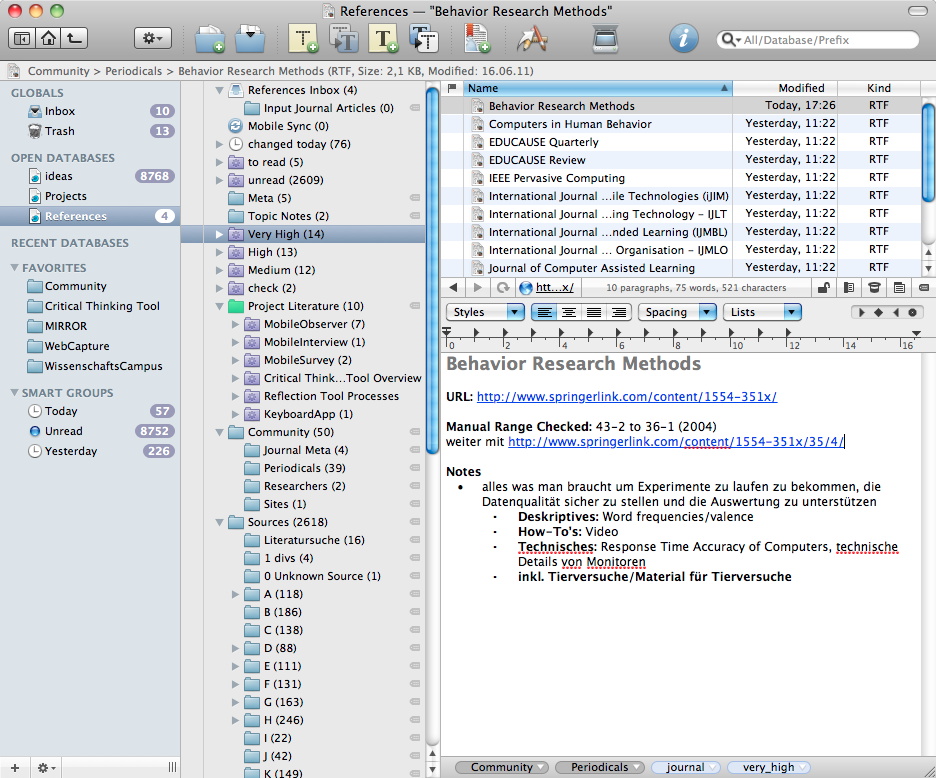
Checking out the journal websites is like reading blogs — you scan the titles of the articles and when you come across an interesting title, you open it in another tab and continue browsing until the end of that issue. Then you check the ones you have opened and save them if they are truly interesting.
While many journal websites offer RSS feeds (and DEVONthink can deal with them), I do this manually when I have time.
Non-Journal Input: WebClippings
Not all literature comes in academic articles (which are mostly PDFs). Sometimes you stumble upon a news report on a webpage. DEVONthink offers a quick way to save it via bookmarklet clippings. You can download them on the DEVONthink page and install them in Firefox or Safari as bookmarks and when you click on the bookmark the current page is save as PDF (it happens in the background — very convenient, but check it, sometimes there are mistakes in the PDF). You can also save a selection of text in your database inbox. Given that the URL is saved as well, this is very convenient to quickly add something to your database that might come in handy later.
I store WebClippings in a different folder (group) than the journal articles. But I tag them accordingly. A smart group shows me the journal articles of a given topic (e.g., mobile devices), another the web clippings about this topic. I use the same strategy for images and for videos.
Storing articles
There are three golden rules in storing literature:
First, decide on a clearly defined way to name the files and stick to it. It will happen that you read the same article twice and not notice it until you find a marked copy somewhere else. Clearly naming each file allows you to find duplicates more easily. Personally, I use the authorNames_year style, e.g., an article by Field and Hole 2003 would be saved as field_hole_2003. If it’s more than 6 authors, it’s the first author name only (and year). If an author published multiple papers in the same year, I assign an a, b, c, … to the author name. While this is not necessary for DEVONthink because it can deal with files with the same name, you need some way to differentiate the articles, especially when you use an additional text file to jot down your thoughts about the article. While it’s best to immediately save the article in that format, however, in DEVONthink you can rename the files easily and when I’m “in the flow” and downloading hundreds of articles (going through the back issues of “Behavior Research Methods”, I love that journal), I wait with renaming until later.
The second rule is that you need to have the source. It doesn’t mean that you have to enter it immediately in the correct citation format (e.g., APA), but you need to know where an article came from. Otherwise you cannot use it later and it will make you insane trying to reconstruct where you got a certain article. Luckily, many journals have the information on the first page of each article (e.g., journal name, year, issue, etc.). But make sure that you have this information. Personally, I do not write the correct citation format anywhere until I need it — i store too much literature and use to little for it to make sense. But I always make sure that I could write the correct citation when I need it.
The third rule is that you need a way to find the interesting literature again. This becomes an issue when you go past the 100 articles area (usually very quickly). Personally, I use tags, especially tags for specific projects I am working on and tags that denote what I have already done with the article (see below).
Reading articles
I’m going to write a dedicated post on the art of reading an article some time soon, so here only a few pointers.
- Make sure why you want to read the article. What questions do you have? What do you want to know? Otherwise you are likely to end up highlighting anything and everything.
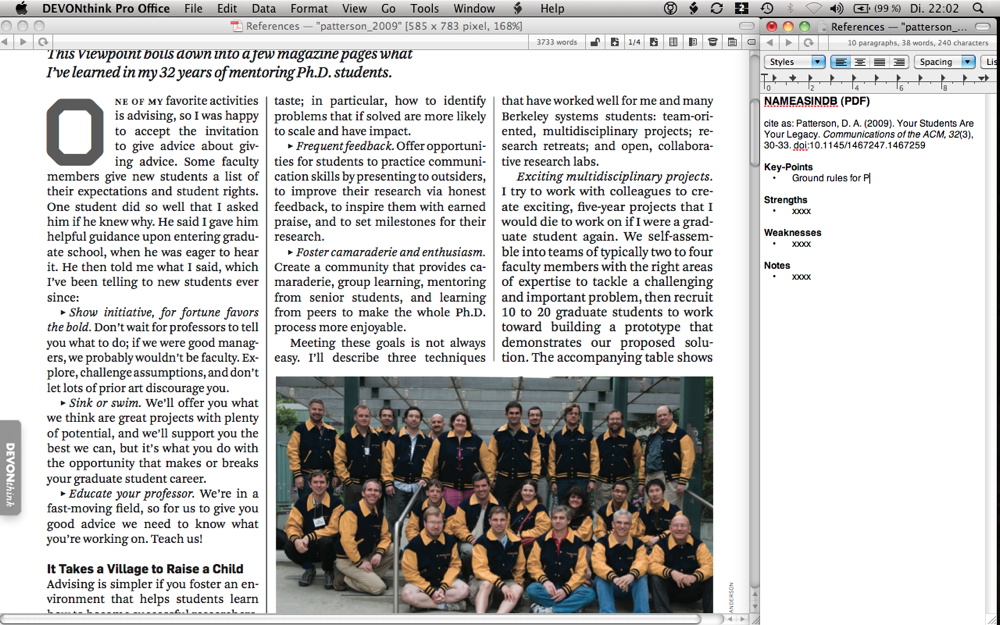
- DEVONthink allows you to read PDFs in a nice fashion on the Mac in a fullscreen mode and use highlighting (mark the text, then press cmd + shift + L). Personally, I use the dashboard widget to make notes while reading and it lays over the fullscreen mode.
- Alternatively, I read it with a rich text file besides it to quickly write down interesting bits.
- Once you have read the article, jot down the important bits in a text file named the same way as the article. This way you can more easily remember what was important about it.
Tag the articles
It’s useful to tag articles (or files in general, whether it’s an image, web clipping, video, or audio file) — see above. Tagging is mentioned after reading the article, because you cannot accurately tag an article if you haven’t read it. It is very helpful to create a tag list so that you remember which tags you want to give.
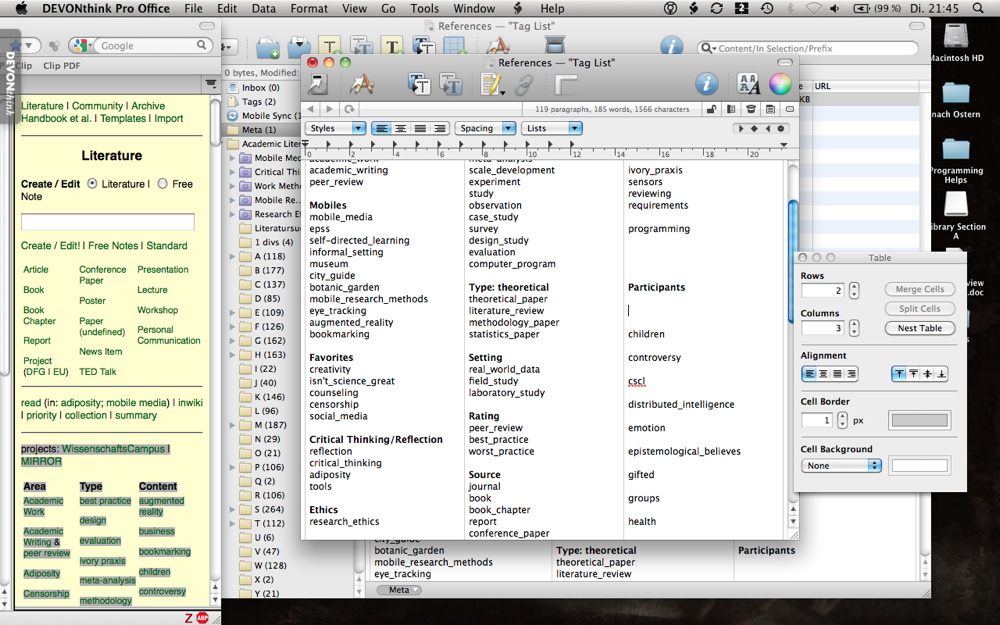 I used the tag list I already had in my wiki to create a tag list in a rich text file in DEVONthink.
 Assignment of tags is more easy in the Inspector, as DEVONthink unfortunately only gives you a small line for tags. A rich text file with my tags (tag list) is on the left.
Tags for projects (e.g., diss_empirical_part, article_ct_1) are also helpful. With smart groups you can easily see which articles are relevant for a paper you want to write.
I also give tags like “read” and “processed”, indicating that I have read an article and that I have assigned keywords to it.
Given that DEVONthink doesn’t handle tags very efficiently (it displays it only as a long list) I have created a rich text file with the tags I want to use. Displaying it next to the DEVONthink window allows me to quickly remember the necessary tags.
If you use a text/rich text file to store your notes about the article then select both files, the text file and the PDF and then assign the tags for both at the same time. This only works when both files have the same tags, although there is a script for it if they deviate.
To be continued …
These were only some pointers about Literature Management — I wanted to write down some things now instead of in a few weeks (given that work will get stressful (or rather: more stressful) again soon).
“I’m going to write a dedicated post on the art of reading an article some time soon”
I’m definitely looking forward to that post. Thanks for all of the information! Very helpful.
What a great page – thanks for sharing your ideas. I have been playing with DTP, Scrivener, Circus Ponies .. I came across your site through a search and it couldn’t be more significant or helpful!
Hello Deb,
thank you for the nice comment 🙂 I had a look at your blog, which led me to a brilliant video (the psychology equivalent of the humanities video) and the http://www.phinished.org forum — thank you very much 🙂
(That’s the nice thing about comments, you get not only feedback or support but also interesting links :-))
BTW, if you plan on using Circus Ponies, the posting How to Write a Dissertation Thesis in a Month: Outlines, Outlines, Outlines is probably interesting.
All the best
Daniel
Hi, Daniel.
I read your very interesting threads on DevonThink. It seems that you have stuffed all your data into a DT database. Well, I can’t see the benefit of doing so but I’m very interested.
You wrote that you tagged all your documents, which means that they are all at hand with search programs like Spotlight, Leap, Yep, Tags, Punakea etc. To implement a well fitted data structure you can use the Finder where you have smart folders, alias etc. as well. If you use Time Machine your data will be quite safe and with Dropbox you may use them where you need to.
As I found out the use of a DT database at several locations seems to be critical. DT files don’t work with QuickView.
I’m just at the point to reorganize my data, so I really appreciate any convincing advice.
Thank you.
Dick
Hoi Dick,
hmm, convincing advice … difficult … I’m not out to convince you of using DEVONthink. Personally I think that there is no best program to organize data but the one that suits the person, the situation and the data best in a given moment.
Regarding the differences between DEVONthink and Finder, however, you’re right, with Finder using data in different places via Dropbox would be easier. DEVONthink warns against using Dropbox or any shared folder for its database, so it’s a local installation only. However, this is not important for me as I carry my notebook with me (and like to have the data on my physical device, not somewhere in the cloud), but I can see that for some scenarios, using cloud services is better (and thus not using DEVONthink).
Regarding the functions there are some things that Finder cannot provide me with, I have written about a few of them here. Personally the quick editing of text and rtf files is the convincing argument for me, combined with the ease of inserting graphics in rtfs (much easier than using graphics in a wiki, although the graphic is not only once in one central repository but in every file it was inserted into) and the tagging (which is a continuous process, I’m not finished).
Personally, if I were you I’d try out the test version and have a go. Find out whether DT offers something that Finder cannot do, but only if you do not need the data in the cloud. If you do, DT will not work for you.
All the best
Daniel
Daniel,
I picked up this blog from the DT blog; I’m constantly looking to improve my use of DT and read examples of use often. I have an eclectic database, mostly focused on science (I teach classes on Science in the News to a lifelong learning group), but other interests are included as well. I thought I’d pass along some aids I use that might be of interest.
RSS feeds: I use Pageflakes.com to collect about 30 different RSS science feeds. The visual presentation is easy to use (three column layout) and I have a number of pages each collecting different themes (science, news from different world areas, etc.) I find this layout preferable to the traditional reader list.
Annotating PDFs: I started using Skim, extensively. This free application, has more flexibility than Preview and you can save your notes within the pdf (export, pdf with embedded notes) or in a Skim format (export, pdf bundle). The latter is also accepted by DT, with Skim as the default reader. While the reference is immediately opened in the DT Preview, clicking on the “Open in External Editor” opens Skim (http://skim-app.sourceforge.net/). Thus you don’t need to generate a separate text file as a companion to the pdf.
I also subscribe to electronic editions of magazines. I now use an Applescript that places a bookmark at an article of interest within the magazine, and the bookmark appears in the Inbox of the database, to be re-assigned when convenient. See the DT forum: http://forum.devontechnologies.com/viewtopic.php?f=4&t=11779
I haven’t dealt with DT and videos/pictures, although I have the same needs that you posted, using this material in different classes. Right now, I file the pictures or videos in appropriatley labeled folders in the directory. I may try linking within DT and using tags, as you suggested, so that I have a better handle on the film content to use in different classes.
Harold
Hoi Harold,
thank you very much for sharing these tips 🙂
All the best
Daniel
Hi Daniel,
(Apologies for my English as I am not a native speaker) I am starting to work in my PhD dissertation in law. I doing some preliminary research on digital academic workflow and possible applications before I get into work!. I found your blog extremely helpful, particularly your ideas about outlines. Thanks for that! Following my research, I am considering to use a combination of Devonthink (sources management), CPN (outlines), Scrivener (writing) and Bookends (citations and bibliography). At this moment my three key doubts are (i) where to annotate and summarize articles, DT (as you mention in this post) or CPN (“outlines, outlines”)? (ii) Where to save the files (mainly pdfs), DT or Bookends? (iii)And how to really integrate Bookends in the academic workflow. Furthermore, I tend to read articles in my ipad, so I need to integrate this also in my work flow!! Any hints for a newcomer??
All the best,
Lucila
Hoi Lucila,
(no problem, I’m not a native speaker either) Your workflow will probably be your own, try out a few things — it has to work for you and for the discipline you are working in. I suppose law is highly citation intensive, so you need a good literature manager. Regarding your questions:
(i) actually, annotate on your iPad (e.g., with GoodReader), then I would put the notes into a CPN file (in a topic notebook, it’s one of the next postings I’m going to write about, although it’s already mentioned in the book).
(ii) that depends — if you have mainly homogeneous literature bookends can deal with very well and you also search for this literature in bookends, then I would probably use bookends. Personally, I store all my literature in DT, mostly because it is more flexible. I can download articles, simply rename them in the standard format and be done with it. The literature I have read (not what I want to read, but what I have actually read and is now in a CPN) now ends up also in Mendeley. If I use it I need to cite it and Mendeley gives me the APA format. Also, I want to try out the social network function of Mendeley. But if bookends really integrates well in your search process, you might want to skip DT.
(iii) For me, it’s the last step. When I have read a text I make sure that I have the source information available and put it into my literature manager. One of the next postings will be about the workflow, perhaps there are some ideas for you. BTW, I also did a diagram about it for the book, there is a lot of information in it regarding writing a dissertation, reading digitally and the like. I also highly recommend the current series about scientific work, esp. the ones about Workshop: Scientific Work – Finding & Selecting Literature, Workshop: Scientific Work — Managing Literature, and Workshop: Scientific Work — Reading & Using Literature.
Regarding the integration of an iPad — I would tag the articles you copy to your iPad in your literature manager or use color coding (e.g., blue = on iPad). Highlight and annotate them on the iPad, then send yourself the Summary (= everything you highlighted and your notes) per eMail and store the highlighted PDFs somewhere else. I actually end up with an annotated copy in another database. You can easily delete your annotations if you need to, but I want to have both available for later, the annotated version if I want to check something, and the one without annotations when I want to give someone else the article (but not my notes). You can copy the PDFs directly to GoodReader via the Apps tab in iTunes — select GoodReader and move the PDF into the window. There are also reference manager that have an iOS version and allow easy syncing, however, I find them somewhat slow when it comes to showing the PDF so I prefer GoodReader.
All the best and good luck for your thesis
Daniel
Hi Daniel,
Thanks for all your help. I read your workshop posts on scientific work, and I have bought the kindle version of your book !!.. now I only need to find extra-time to read it!. I think I’ve made a lot of progress in my academic digital set up to start working on my thesis. Although I have to confess that the learning curve of all these applications on top your own academic work is sometimes a little bit frustating.
One additional doubt (and curiosity): why don’t you recommend CPN (ipad version) to prepare outlines directly on the ipad while reading an article, avoiding the Goodreader’s notes step (you can keep the annotated version of the pdf using Goodreader, but write all the notes directly on the CPN outline)?
Thanks again for all your help.
All the best,
Lucila
Hoi Lucila,
thank you for the feedback 🙂 And yes, the organizational overhead takes time and organization should never become the focus of itself (unfortunately, it is often easier than doing scientific work … which makes it so tempting to optimize forever and never do anything). On the other hand, good organization prevents plagiarism (which can kill a thesis quickly).
Regarding using CPN on the iPad — two reasons:
1. I find the iPad version too slow and not snappy enough. I think it’s great to carry your notes with you (one of the next postings will be about topic notebooks, and the iPad allows you to have this information easily available). But I would not work with it at the same time.
2. I would focus on the article — making notes in the article at the place where you have the idea or to which the note refers to. Once you export the annotations you have the notes with page reference (and any highlighted text that you did in addition to the note). If you keep the annotated file you have more information available than if you have notes in CPN. For me, that’s the second step that comes after reading the (relevant parts of the) paper.
All the best
Daniel
Hi – I came across your amazing site – finally getting back to the dissertation that I WILL finish this summer. But need to organize years of material. I am a huge fan of mendeley for three reasons – the web import tool that allows you to import anything to mendeley when you come across it, the cite-as-you write function (in any journal style) and the automatically generated bibliographies. Can Devonthink do these things? On your recommendation, I’ve purchased pro. Also don’t understand why you would replicate a bibliography in circus ponies (which I’ve also bought on your recommendation as well as scrivener -OMG have no idea how to use any of them). I’m trying to come to grips with all of this very cool stuff but have just begun the journey. Thanks so much, Jennifer
Hoi Jennifer,
no, Devonthink cannot replace Mendeley in this fashion. Although some ofter reference manager could replace Mendeley, at least in these functions.
But what Devonthink *can* do is allow you to sort all your files quite easily, by finding the duplicates independent of the file name and by using its artificial intelligence (letzing it search for similar files).
Then you can use Mendeley to refer to the relevant files, while CPN can allow you to create a content outline and write it with Scrivener. Check the Organizing Creativity book for the relevant entries, it might be helpful (would link to the blog entries but currently on slow network connection).
Still, will be a lot of work in any case, tools can help but the cannot replace work.
Good Luck! 🙂
All the best
Daniel
Hi Daniel – thanks! We bought your book – you have become the major reference in our household as we try to organize ourselves/data/research. What do you use as a reference manager? THe fourth thing I love about Mendeley is that everything saved to my Mendeley watch file goes into the library. How do you keep your various libraries in sync (e.g. your reference manager and devonthink?). Jennifer
Hoi Jennifer,
thank you for the compliment. BTW, if you find a different viable workflow or some modifications that make work easier, I’m always interested in hearing about it. 🙂
Regarding a reference manager, I’m trying out Papers2 at the moment. I’m preparing a posting about it, but it will take a while. It’s better than the previous version (much better), but it still gives the impression of being ‘unfinished’ — and at time, like a hack job. For example, on the iPad you cannot see the correct reference of book chapters, which is just … why would anyone release a reference manager where you cannot see the correct reference? Anyway, I’m critical of Mendeley because they were bought by Elsevier (and Elsevier does not have the best reputation), but if the program works for you and does what you want it to do, go for it. 🙂
Regarding keeping the things in sync — I import the files I have read manually in Papers2. Reason being is that I am like a squirrel and collect a lot of literature in DEVONthink — but only the literature I have actually read also ends up in my reference manager. This gives me the ability to cite it easily, redundancy (I have the files in two separate programs), availability on my mobile devices (iPad and iPhone) — all without swamping my reference manager or forcing me to enter the citation information for thousands of files.
All the best
Daniel