“Writing a book is an adventure: to begin with it is a toy and amusement; then it becomes a master, and than it becomes a tyrant; and the last phase is just as you are about to be reconciled to your servitude – you kill the monster and fling him to the public.”
Winston Churchill
Last year I took a vacation for a month to write my dissertation thesis. And it took me that one month to come up with the first draft, which made it into the final version with only minor alterations (but a lot of error checking). While the lack of major alterations might be in part due to my academic advisers (and my) wish to finish the work as soon as possible, I think the major part of this is due to the way it was written, or rather structured.
Doing a dissertation thesis is a major project, the writing itself is a different but not less complicated animal. I think it is a mistake to start writing in sentences unless you know the structure and the content. Once you write sentences, they stick together and are hard to change. And I think it is nearly impossible to write a 200+ pages work if you do not structure it beforehand, and there is a great way to do so: Outlines.
Most people know outlines from school. Many teachers try to give this valuable hint for exams. Plan what you write before you start writing. An outline for a dissertation is similar, but not quite the same. For one thing, it is much more detailed.
How detailed? Well, everything you want to write later should be included in it, without the actual sentences. Metaphorically it should contain the bones of the text, the whole skeleton, and hints for everything else. This means
- the order you want to write the different pieces of information that make your theory
- the notes you made about your studies, the design, the participants, the instruments, the procedure
- the results of any statistical analysis you made
- the ideas for and the issues you want to raise in the discussion
It also includes any notes you do not want to forget and any ideas, e.g., for further studies even if you cannot realize them (a valuable hint from my informal academic adviser: you will have ideas of things you want to realize but you cannot realize everything, so make notes and raise these points in “future work”).
Given that the outline only contains the information, but not the sentences, it is easily changeable. And once you get in the flow of adding flesh to the bones, you can write really fast. An additional benefit of using outlines: I used the same outline as a basis for the articles I wrote about my dissertation. The outline also allows you to focus only on the relevant part by using the hierarchical structure: You can arrange the information similar to the structure you use for your PhD thesis and simply fold in the parts you do not need at the moment. This way, thousands of lines of text become easily manageable. For example, you can fold the parts between the introduction and the discussion to write parts of the discussion while simulateneously seeing parts of the introduction. Sure, you could do something similar with Word’s “split view”, but not as easy and with this focus on the parts you want to see.
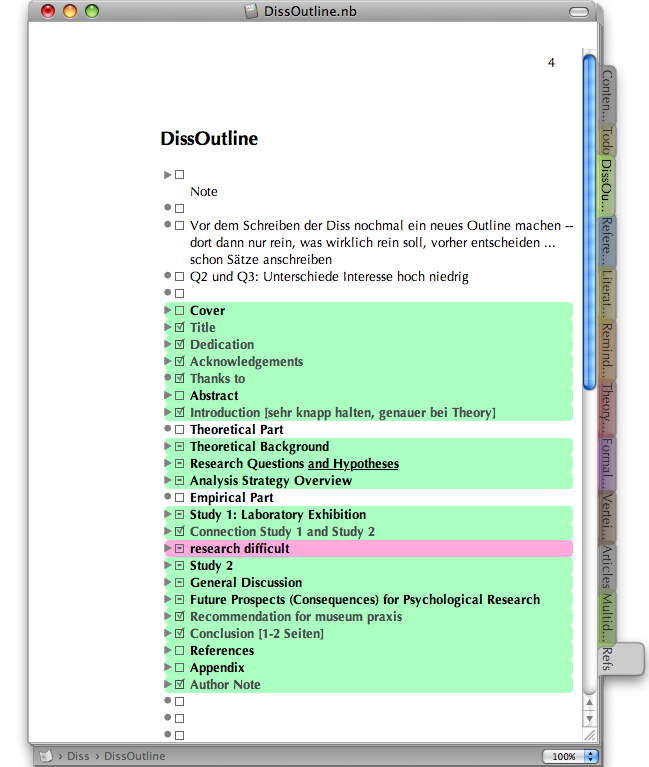
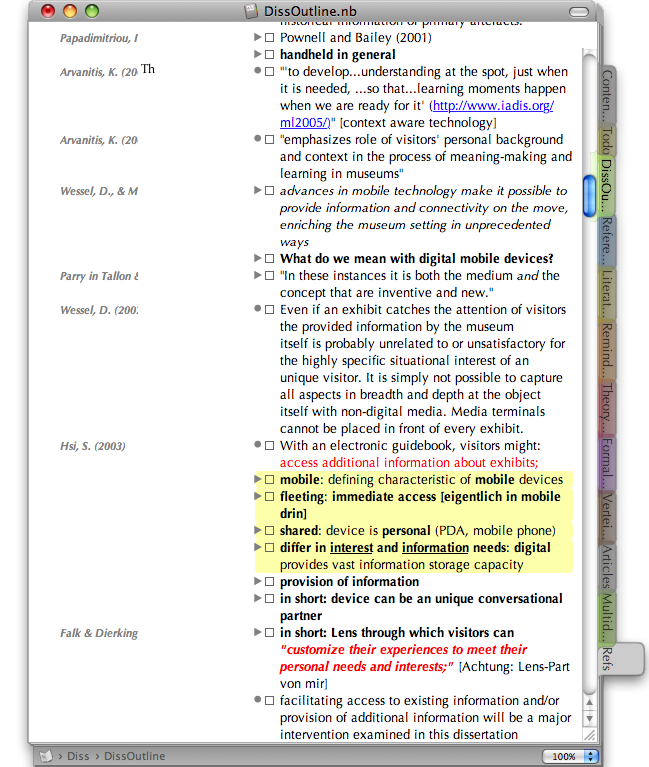
Personally, my outline for my dissertation was a 66.5 MB Circus Ponies Notebook file, containing 333,215 words (> 2.2 million characters, equivalent of about 1305 pages). I made sure to write down everything I did, the results of any analysis, etc. It was more or less structured in the way I wanted to write my dissertation. With this outline next to my writing program (Scrivener), it was possible to come up with a good first draft within a month. Why? Because I first read the whole outline, taking care to move the information that did not fit where it was to the correct place, then sorted each sub-point (e.g,, theory, results of Study 1) in the correct order, and then used this sorted outline that contained all the information I needed to write it as a guideline to write that chapter. Given that the sources were marked in the outline (see Academic Workflow) I did not have to check other sources for the actual writing. I didn’t even have to re-check statistical printouts — it was all in that one huge outline (and then in a smaller one that dealt only with the chapter).
 |
 |
I created the outline before I started to write, during the last year of my PhD. But thinking back, it would have been much easier to create the outline during the whole PhD thesis time, as soon as the topic and the first experiments were decided. Noting the decisions (and the reasons for doing so), the results, etc. while planning and doing the studies would have made it much easier in the end, but it also worked this way.
So, I can only highly recommend creating a detailed outline prior to writing and using it for the writing process. It makes an insanely complex work manageable. 🙂
I received a question regarding the transfer of notes from other programs to Circus Ponies Notebook:
Hmmm, if I understand the question correctly you are currently using three different programs for writing your dissertation (Bookends, Scrivener and Papers) and now you want to create an outline in CPN … good question … hmm, first, do you really want to take a step back? An outline makes sense to organize the material you have in a red thread and collect all information in one place that you can use (with Scrivener) to write you dissertation in one go. At the moment, you already have written text … hmmm …
Okay, it’s difficult to say (will be influenced by a lot of factors I don’t know, like the rules of your field for dissertations, the time you have left, your goals, your working habits, etc. pp.) and I wouldn’t bet my dissertation on it, but I would probably go alone the lines of this:
1. What is the problem? Do I have problems making a coherent package out of my material? In this case, going back to an outline might be one way to solve it. If, however, I’m just not motivated to write, I don’t want to finish it or I’m looking for some other thing to do, I’d grind my teeth and punch through writing the way I did before.
2. If it’s the first case and now I have to put my material in one CPN file, I’d create one outlining page, start with the sections of the dissertation (title page, abstract, introduction …), highlight them, and then manually copy the text I have already written into this outline. The reason is that if the structure is a problem (it usually is), you need little cells of text (one argument per cell) that you can organize hierarchically and move really easily. You can try to automate it by copying your whole text first (depending on the fonts you have used, e.g., for formulas or the importance of formatting you have already used by compiling a draft from Scrivener and using this as a starting point), then paste it into a pure text editor (like TextWrangler) and then copy it onto the notebook page with “Edit – Paste – Paste Text as Outline” to avoid switching between two applications, but the division into cells you’ll have to do yourself.
3. While pasting I would use the situation to make notes (using a cell on its own with text in another color). You might have some ideas what to do and what you still need to check, use that moment.
x. optional: If I need the references as keywords (only if you want to write what they have said as text and keep the reference in the margin) I’d copy all references (only author and year or however they are cited in the text in your discipline, mind the Miller 1999a, Miller 1999b, etc. if one author has published multiple papers in one year) at the end of the outline, and then — for each reference — highlight it in the text (not the cell) and make a keyword out of it (assign as keyword). This way CPN already knows the keywords and I can assign them to the margins easily (you have to leave at least one occurrence of the keyword in the file, so give the references a top cell like “refs” and fold this in and keep it at the end of the outline where it doesn’t bug you. But this is a large step backwards in the process, as I would tag cells with only one reference. This means splitting up/copying sentences if you refer to multiple sources.
4. Then I’d resort the cells in a fitting order. I’d make sure that the whole structure has a hierarchical order and let’s me easily see the gist of the different sections (summaries in the higher cells). I’d make sure that the whole picture is coherent and invest work in the parts that aren’t. Perhaps changing the structure, perhaps hitting literature again.
5. Once I’m sure I have a coherent work that is “enough” to get me the grad I need (for me: “magna cum laude” to stay in research, which luckily worked out) and after checking with my supervisor, I’d write the whole text (I can recommend taking a month off and copying the text sectionwise into a new CPN file and then checking the order again. If you stumble during writing it’s often the order/structure that’s a problem. Try to catch this first.)
6. While writing I’d put the text citations into the text (or use the Reference Manager that you have assigned to Scrivener). After writing the text, if I did the references manually, I’d put in the references at the end of the document.
But like said, I’d only do this if structure really is a problem. CPN is great for making an outline that really deserves the name — that contains all the information in one huge structure you need to write. A good outline (yup, like said, this means manual work) allows you to see the structure on the higher levels, allowing you to fold in the sublevels and concentrate on whether your arguments make sense. This is often lost in the text.
One important aspect: Keep your papers (with notes regarding the papers) sorted the way you did it (if it works for you). The dissertation is a project that will be finished. The outline you create for writing it can be used as a starting point for articles and future work, but one day you’ll have to go back to the place you have sorted your papers in. I have tried using CPN for organizing papers I read and while some aspects worked really well (like tagging each cell with the reference) it got slow fast. I switched to a Wiki (and highly automated some functions with Javascript/PHP, i.e., Ferret) to make it usable. Currently I have over 1000 papers/books/whatever in my literature section — DokuWiki can handle it, CPN would probably have been slow as hell. So, whatever you do, use CPN’s outline function to get the structure in order and get all your material for this project in one place if you need to, but keep your literature in a separate collection.
I hope this answers your question.
Best regards
Daniel
This is the third often read posting I have in my blog. I think (and am pretty certain) that outlines, especially using Circus Ponies Notebook, helped me — or rather enabled me — to finish not only my diploma thesis but also my dissertation thesis, not only in a month but ever. I’m curious, what are your experiences? Did it work for you? If now, why? If you found another solution, what worked for you? It would be nice to hear a comment from you if you have read this posting. 🙂
Very useful.
Concerning your most recent comment: I think it’s the third most read article in your blog because it’s the number 1 google search result for : how to write a dissertation thesis in 1 month –> which brought me here.. Add millions of other lazy bastards who work at the last minute and voila!
Hello Sam,
thank you for the comment — I didn’t know that Google liked this posting that much, cool 🙂
Best regards (and good luck for your thesis)
Daniel
PS: The writing took one month, the preparation for the writing phase took a little longer. 😉
I commend your spirit and your nice expressions. I do really enjoy every single word you wrote. I’m working right now on my thesis and I’m totally frustrated, bored, don’t know how to finish it and how to manage my time. What you wrote made me think that writing a thesis is not so hard but it needs time, outlining and most important optimism!
Thanks for sharing this with us.
Thank you for the positive feedback 🙂
I think it’s quite normal to feel this way when doing a dissertation thesis — there are many crises (e.g., Dissertation Crises, or Dissertation Crisis — Past the Mountain) and while a dissertation is (supposed to be) difficult, it’s good to keep it in perspective. For example:
or
or
So, if you are stuck, perhaps creating an outline will help. And like Churchill said, “If you’re going through hell, keep going.” I wish you the best 🙂
Hi Daniel. I read your story about your thesis writing and understood you write about 333000 words in just one month,how did you do that?I am a PhD student in engineering really struggling with my writing up, I almost have not written anything because of my depression problems. I have about a month and half to submit, I have no limit but want to write at least 100 pages except the bibliography and appendices. I appreciate if you advice me how to do it.many thanks Hannah
Mai I mention here that I do have outlines and kind of know the structure of thesis writing.
Hoi Hannah,
nope, writing 333k words in a month would be a feat beyond me. 😉 I created the outline during my dissertation prior to sitting down to write the thesis. What I did write in that month was the dissertation thesis itself which was 250 pages long and had about 71000 words. I did not use all the material I had in my outline and the hierarchical structure made it possible (and fairly easy) to select among the material I wanted to use.
Regarding your case — difficult. If you have a depression (in the clinical term, not in the colloquial meaning), then this should probably be a priority (and not my field of expertise, that’s something for the local health service). Regarding the writing — personally it helped me a lot to use the outliner to create a content outline. This goes beyond the structure — it externalizes all what you want to write and allows you to resort the content in the structure that fits best, without starting to write sentences that stick together. Then you can focus on the criteria on scientific writing (e.g., Alley’s criteria, see here or the other postings in that series). However, there is a huge risk here if you have a deadline looming: It stays pre-text for a long time. For me writing the thesis from the content outline was quick (I can type with 10 fingers and am reasonably fast), but it was easy for me to sort the material and I had no looming deadline. So, using the same strategy might be a way that might work, but nobody can guarantee success.
All the best
Daniel
Well i completed my thesis in few weeks, but i adopted a unique method, I had the draft out sourced and when i got it back i made my own changes to it and it was ready. I used [URL REMOVED]
They were right on money and topic
Normally such a comment would be sorted into the spam folder, but after removing the I’ve approved it to make a point. Outsourcing is not a unique method — it’s unfortunately common with some people who think they can buy an academic degree. Well, some are paying for college and some will pay for others to do their work later, so why not for the thesis too? Well, because it’s plagiarism. Unless you stated that you used a ghostwriting service in your thesis — which I doubt that you did, because any university worth the name would not accept that work as yours — you lied about who did the work. And the academic work should be your own. Not only did you not learn the necessary skills — nope, seeing the result is easy, doing it on your own is something completely different — you betrayed yourself of the chance to do a difficult high-level piece of work. Something like this is frequently a once-in-a-lifetime opportunity and you blew it. The funny thing, I am willing to bet that in the future — give it 5 to 10 years — some hackers or whistleblowers will make the customers of these ‘services’ public. Or Google/Plagiarism software will improve so much that it will detect these kinds of plagiarisms. And then a lot of people who thought they could buy their title, or a huge chunk of the work necessary will lose it. So, congratulations, you not only blew an academic adventure that you could have had with the right mindset, you also put a time bomb in your CV. Tick-tock-tick-tock … have fun.
Love, love, love your comment to Jenni. Writing my dissertation is proving to be extremely hard but mainly because I want it to be the best possible representation of my body of knowledge. The idea of outsourcing a dissertation is ridiculous. Sooner or later the truth will come out. If Jenni had her “own details” to begin with, she should have used them to produce her own work!
Thank you, I doubt that it will change anything given that “she” seems to be the companies ad/spam person (received another spam message disguised as “PhD student testimonial”), but perhaps other readers will think twice on “outsourcing” the work. 🙂
Thank you, very useful, informative articles. I only have one question is how to write an essay on a topic that you do not know and do not lose face? How to write a good informative article in a short period of time and not to make mistakes? In internet many articles which give different advice, such as, this article https://thesiswhisperer.com/2011/03/24/how-to-write-1000-words-a-day-and-not-go-bat-shit-crazy/ , but they can not really help me and answer my questions.
I study at the Institute and I need in a short time write a good dissertation. Now I do not know what to do … looking for a different article in internet about thesis writing. There I found this article http://phdify.com/blog/how-many-chapters-in-a-dissertation on how to write a dissertation, but it do not tell me how to write a dissertation 2 months. Can you give me some good advice?
Hoi Jenifer,
the only (honest) advice I can give you is to talk to your advisor. They (and the committee) are the ones determining what is necessary for your dissertation. I am recommending this because it seems to me that the problem is not how to write a certain amount of words, or how to write a thesis in a certain amount of time, but because I think there is some confusion about what the dissertation is about. And I might be wrong here! I think for most writing tips to work you have to be clear about what your contribution in your thesis is — and for that you need discussions with your supervisor. Once that is determined, you can do an outline (as I would recommend) or use Mewburn’s tips.
(And as for outlines — yup, I think there are great, but they will not work for everyone. They are an option you should know about. And while I did write my thesis in a month — the first and nearly final draft that is — I did it with an outline I had created during nearly three years of studying.)