Archive

Posts Tagged ‘writing’

Scrivener Introduction Video

February 2nd, 2012 No comments

I have recommended Scrivener — for me the best writing software ever — multiple times. It is hard to give a correct impression of the advantages, but the posting Scrivener — A perfect program for dissertation writing tries to give an overview. It is my most frequently read posting. However, some people might like a video and there is an excellent one linked on the Scrivener Trial page, or available on YouTube. The creator of Scrivener, Keith Blount, gives a 10 minute introduction of the program:

Highly recommended, especially if you combine it with a good outliner like Circus Ponies Notebook, and available for Mac and PC (Windows).

Draft Version of Organizing Creativity 2nd Edition

January 11th, 2012 No comments

Hey everyone,

I’m still working on the second edition of Organizing Creativity.

It takes longer than expected (it is a spare time project), so, I’m putting the current draft version online.

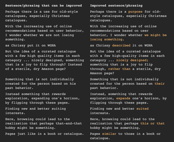
sample_page_oc2_0

It contains the content of the wiki I had here, so I have removed it.

Like I said, it’s a rough draft — some parts are (almost) finished, others are missing in part or completely — but to make the best of the longer work process, posting it online gives me the opportunity to ask for feedback. This is your chance to influence the final version. What do you think of the content and/or the layout? Any suggestions for improvement? I’d like to hear them. Drop me a line at danwessel@organizingcreativity.com or write a comment.

All the best

Daniel

Presentation: How to Organize a Scientific Work [German]

October 4th, 2011 4 comments

Kurz gesagt: Ihr seid hochqualifizierte Leute, die man nicht auf der falschen Stelle verschwenden sollte. Ihr seid ehrgeizig, im Sinne von ihr wollt etwas erreichen, gefördert werden, weiter kommen. Sucht euch das passende Umfeld genau aus wenn ihr könnt. Promotionsstellen sind Qualifikationsstellen — es reicht nicht, dass ihr die Arbeit für die Stelle gut macht, die Arbeit auf der Stelle muss euch weiterbringen und euch selbst weiter qualifizieren.
Vortragsnotiz aus “Die Zukunft deiner Forschung — Wie organisiert man eine wissenschaftliche Arbeit?”

Note: The following presentation (PDF with Notes, which contains the script) is about ways to organize a scientific work. I did this presentation at the MinD-Akademie 2011 in Hannover and thus it is in German. It was my best presentation ever. Loved the audience :-) . Regarding an English version, I’ll be doing a translation soon. [Update: Translation is online in this posting.]

mind-akademie-2011-vortrag-graubilder-mit-skript-cover-2Auf das Bild klicken um die PDF angezeigt zu bekommen (ca. 5 MB). Ein Teil der Bilder in der Präsentation sind ausgegraut, weil ich leider nicht das Copyright für diese Bilder besitze. Das mindert die Qualität der Präsentation, auch wenn sie nur zur Illustration eingesetzt wurden. Auf der anderen Seite sind alle wichtigen Informationen in den Notizen vorhanden. Das Design der Folien beruht zum einen auf ein Template von Apple’s Keynote (Cover), wobei die Seiten von den Aperture/iPhoto Photobüchern inspiriert sind. Die Angaben zur empfohlenen Literatur ist hier als eigener Eintrag verfügbar.

Poster: Wie organisiert man seine Kreativität? [German]

October 3rd, 2011 5 comments

English Note: This posting is about a poster I did submit to the MinD-Akademie 2011, showing on one (very large) page how one can organize one’s creativity. It was accepted and well received. The poster is in German, but I will do a translation soon. [Update: Translation is finished and available in this posting here.]

MinD-Akademie 2011 Poster

Das Poster zeigt die verschiedenen Punkte die wichtig sind, um Kreativität zu organisieren. Während der Prozess von oben nach unten läuft, ist jeder Punkt auch eine Beschäftigung mit dem Thema (gelbe Pfeile nach oben) und führt entsprechend zu weiteren Ideen (mittige Pfeile nach unten). Auf das Poster oder hier klicken, um das Poster als PDF in DIN-A0 zu sehen (die Bilder selbst sind runterskaliert, so dass die Datei “nur” ca. 7 MB groß ist). Die Datei ist in der Dateigröße reduziert, die Bilder sollten aber trotzdem in druckbarer Qualität sein. Das Poster, das ich ausgestellt hatte, habe ich in Hannover gelassen (vielleicht hat es ja ein nettes Heim gefunden, sonst wurde es halt entsorgt). Ich musste los, habe mein Poster nicht gesehen (oder ich war grad blind) und ich habe mich auch von einigen Leuten nicht (bzw. nicht richtig) verabschieden können (war auch was k.o., auch wenn’s/weil’s riesigen Spaß gemacht hat). Ich hoffe, ich sehe ein paar Personen bald wieder, auch gerne mal zu Besuch in Tübingen, auch wenn ich die Namen grad nicht verfügbar habe (ich denke, ich habe den Networking-Workshop wirklich gebraucht — war gut und eine gute Erinnerung).  Ich wünschte halt, ich hätte mir die Namen notiert, von den Personen, mit denen ich interessante Unterhaltungen geführt hatte (hmm, in der Badewanne eben gab’s eine nette Idee für eine App bzw. die Fortführung einer älteren Idee dazu  … ;-) ).

Literature List: How to organize a scientific work

October 3rd, 2011 No comments

“I took a speed reading course and 
read ‘War and Peace’ in twenty minutes.
It involves Russia.”
Woody Allen

Last weekend, I did a presentation for the MinD-Akademie in Germany with the topic: “The Future of Your Research — How to organize a scientific work?”. It was a lot of fun creating the presentation and even more fun holding it (great audience :-) ). Over the next few days I’m going to put the material online here. As this takes a while, here the cited literature:

Science in General and Advisers/Colleagues

  • Cham’s “PhD Comics”: http://www.phdcomics.com/comics.php
    I could have done the whole presentation with PhD Comics, but no one would have believed that they actually describe “real” situations (“real” because it’s a little over the top, but always with a nugget of gold). Great to get a humorous view on academia.
  • Sternberg’s “Psychology 101½”: Sternberg, R. J. (2003). Psychology 101 1/2 The Unspoken Rules for Success in Academia. Washington, DC: APA.
    A very good book by a distinguished professor about life in academia. While written with psychology in mind (he is psychologist), some aspects can probably be applied to other domains.
  • Pausch’s “Last Lecture”
(Video & Book): Pausch, R. (2008). Really Achieving Your Childhood Dreams. New York: Hyperion. [Video here on YouTube]
    A brilliant presentation about a person’s life in academia (and in general) — it shows what you can accomplish and what is needed. For all who think that a job in academia is more than just making money to life by (badly in many cases).
  • Schwartz’s “The importance of stupidity in scientific research”: Schwartz, M. A. (2008). The importance of stupidity in scientific research. Journal of Cell Science, 121, 1771. Available at http://jcs.biologists.org/cgi/content/full/121/11/1771
    A one page article about the necessity of feeling stupid while doing research. Should be required reading by every PhD student just to get the “but I did study it, why don’t I know the answer in advance” out of one’s mind.
  • Patterson’s “Your Students Are Your Legacy”: Patterson, D. A. (2009). Your Students Are Your Legacy. Communications of the ACM, 32(3), 30-33. doi:10.1145/1467247.1467259
    A brilliant argument for good advisory — and what makes good advisory. Should be required reading for everyone who advises students.
  • Schmidt & Richter’s Artikel von 2008 und 2009: Schmidt, B., & Richter, A. (2008). Unterstützender Mentor oder abwesender Aufgabenverteiler? – Eine qualitative Interviewstudie zum Führungshandeln von Professorinnen und Professoren aus der Sicht von Promovierenden. Beiträge zur Hochschulforschung, 30(4), 34-58. und Schmidt, B., & Richter, A. (2009). Zwischen Laissez-Faire, Autokratie und Kooperation: Führungsstile von Professorinnen und Professoren. Beiträge zur Hochschulforschung, 31(4), 8-35.
    Both articles are in German but they are very interesting — more information on them in a posting about them.

Finding a Topic and Planning the Research

  • Perry’s Criteria for a good dissertation topic: Perry, C. (1998). A structured approach to presenting theses. Available online at http://www.scu.edu.au/schools/gcm/ar/art/cperry.html
    An excellent text about doing a thesis with some very good points on selecting the right topic.
  • Booth, Colomb, & Williams’ “The Craft of Research”: Booth, W. C., Colomb, G. G., & Williams, J. M. (2003). The Craft of Research. (Second Edition). Chicago: The University of Chicago Press.
    More on the basics of what research is and how to do it — applicable for many domains.
  • Ullman’s “Advising Students for Success”: Ullman, J. D. (2009). Advising Students for Success. Communications of the ACM, 52(3), 34-37.
    Another great text about advisory — with more focus on choosing a relevant topic.

Managing Literature

Capturing and Managing Ideas and Data

Preparing Studies and Analyzing the Data

  • Field’s “Discovering Statistics Using SPSS”: Field, A. (2005). Discovering Statistics Using SPSS (2nd Edition). London: Sage.
    My statistics book was the Bortz (German book) — which was … not that suited to learn what statistics is about and why it is interesting and useful. Field manages to do both en passant — a very well written book and highly recommended.
  • Pallant’s “SPSS Survival Manual”: Pallant, J. (2007). SPSS Survival Manual. McGraw-Hill, Open University Press.
    Everything you need to know to do the standard tests in statistics for psychologists. Looks cheap but is the best practical handbook I know. Very, very useful.
  • Goodwin’s “Research in Psychology”: Goodwin, C. J. (2009). Research in Psychology. Methods and Design. New York: Wiley.
    Good basic text about research.
  • Wright’s “Making friends with your data”: Wright, D. B. (2003). Making friends with your data: Improving how statistics are conducted and reported. British Journal of Educational Psychology, 73, 123-136.
    Something every researcher should know — very interesting text.
  • example for a “strange” but very valuable source: Froman, R. D. (2001). Elements to Consider in Planning the Use of Factor Analysis. Southern Online Journal of Nursing Research, 2(5). Retrieved January 9, 2009, from http://www.snrs.org/ publications/SOJNR_articles/iss05vol02.pdf.

Writing

  • Silvia’s “How to Write a Lot”: Silvia, P. J. (2007). How to Write a Lot. Washington D.C.: APA.
    Read this to avoid delaying your writing. A brilliant text that smashes the typical excuses of why not to write and gives very useful hints to write.
  • Alley’s “The Craft of Scientific Writing”: Alley, M. (1996). The Craft of Scientific Writing (3rd Edition). New York: Springer.
    The best text I know of regarding the criteria for scientific writing and a very convincing text that technical writing (e.g., all research papers) is craft, not art, i.e., you need to get your facts straight, not divine inspiration.
  • Bem’s “Writing the Empirical Journal Article”: Bem, D. J. (1987). Writing the empirical journal article. In M. P. Zanna & J. M. Darley (Eds.), The compleat academic: A practical guide for the beginning social scientist (pp. 171-201). New York: Random House.
    Can be found online in a different version (which I did read). The standard text for psychologists working in research.
  • Yaffe’s “How to Generate Reader Interest in What You Write”: Yaffe, P. (2009). How to Generate Reader Interest in What You Write. ACM Ubiquity, 10(7).
    An interesting text to capture the reader.
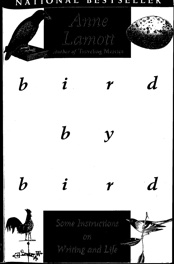
  • Lamott’s “bird by bird”: Lamott, A. (1994). bird by bird. New York: Anchor Books.
    A very good book about (fictional) writing, but with helpful hints for academic/technical writing as well — esp. to write a “shitty first draft”, you can always improve it later.
  • Academic Phrasebank: http://www.phrasebank.manchester.ac.uk
    If reading articles does not give you the necessary vocabulary or you struggle with the right phrases, this site will help.

Reviews

  • Trafimow & Rice: Trafimow, D., & Rice, S. (2009). What If Social Scientists Had Reviewed Great Scientific Works of the Past? Perspectives on Psychological Science, 4(1), 65-78. DOI: 10.1111/j.1745-6924.2009.01107.x
    A brilliant article about how tough and irrational the peer review process is in the social sciences. More in this posting or look directly in the article — very humorous and highly recommended.

Presentations

  • Reynolds’ “Presentation Zen” & “The naked presenter”: Reynolds, G. (2008). Presentation Zen: Simple Ideas on Presentation Design and Delivery. Berkeley, CA: New Riders. and Reynolds, G. (2011). The naked presenter. Delivering Powerful Presentations With or Without Slides. Berkeley, CA: New Riders.
    Brilliant books to avoid death by Powerpoint.
  • TED talks: http://www.ted.com
    Great for inspiration — many of the speakers can convey not only their message/the facts but also why they love this topic.

Sketching at Work

September 9th, 2011 No comments

design_for_a_flying_machine

Leonardo da Vinci [Public domain], via Wikimedia Commons (cut)

I’m currently listening to a presentation by Prof. Martin Eppler about “Sketching at Work” — showing the power of sketches in business contexts. Sketching is a very powerful tool in creativity and as far as I can see, his book (look into it) or here (order) offers a lot of ideas how you can use sketching to solve and discuss your problems.

Very interesting book and I agree, now that we have tools like the iPad that allow sketching (esp. if you use pens like the Pogo sketch pen) sketching is back.

Very interesting :-)

P.S.: If you like to look at presentations which work heavily with sketches, look at the presentations at Khan Academy or (more professionally) the RSA Animate videos.

Typewriter Scrolling in Scrivener

August 11th, 2011 2 comments

It isn’t the mountains ahead that wear you out,
it’s the grain of sand in your shoe.

Sometimes it’s just a small detail that can make you crazy, and with Scrivener’s fullscreen (or now: composition mode) it was the typewriter scrolling. When activated, the line you work with is automatically the vertical center of the screen.

If you are writing the text from scratch, this feature is very useful — you can fixate the same line with your eyes and do not need to go down-down-down until the text is the the very last line of the virtual page (like in Word). But it can drive you crazy if you are editing the text and whenever you type somewhere it is automatically recentered vertically, thus forcing you to visually jump to the vertical center each and every time you change something.

Luckily there is the Format – Options – Typewriter Scrolling Setting in the menu bar, if you disable it, Scrivener does not show this behavior — in the selected view mode. What drove me mad and took me a while to understand is that there are independent settings for the normal window and for the composing/fullscreen mode. Thus, you have to disable Format – Options – Typewriter Scrolling in the composing mode independently from the normal mode, either by going with your cursor to the top of the screen, or by pressing ctrl + cmd + t when in the composing mode.

As you usually do not see the menu bar in the composing/fullscreen mode, it’s easy to miss it.

Interesting Discussion going on about Thesis Writing

August 1st, 2011 No comments

“I wrote them down in my diary so that I wouldn’t have to remember.”
Professor Henry Jones, about why he and his son need to go into the lion’s den to save his diary, in “Indiana Jones and the Last Crusade” (1989)

I’m currently preparing a presentation for a student group about organizing an academic work (focus is on a dissertation thesis, but it can be applied to any major written work). Interestingly, there are currently a few questions about establishing academic work flow, esp. regarding storing citations. The discussion is going on in the posting about Circus Ponies Notebook for Academic Writing (e.g., Thesis Writing).

If you have ideas I’d like to hear them — how do you manage your sources?

Questionnaire for Organizing Creativity 2

July 22nd, 2011 No comments

It’s been a few years since I wrote “Organizing Creativity” and in the meantime I have learned a lot. I am also critical of the style of the book — I wanted to write everything I knew, I did and it shows. It contains a lot of information, but it is not exactly easy to read.

So, I am currently working on a new version, more concise and more useful for practical application. For this version I would like to ask you for your input. How do you organize your creativity? What skills and tools did help you? What gave you a boost in working. The questions are very broad and no matter how trivial or supposedly widely known it is, I really like to hear about it.

Which skills help you to be creative?

Which tools help you to be creative?

Is there anything else you think is important for creativity or its organization? If so, what is it?

In which areas are you creative?

If you want to, you can also give your name and eMail, but you don't need to. I promise not to abuse this information.

Your Name

Your eMail

Thank you in advance :-)

Daniel Wessel

Getting that brilliant sentence back when Word crashes

July 15th, 2011 No comments

“Mr. Jones, are we ready to release our new software?”
“Yes, sir. As requested, it’s full of bugs, which means people will be forced to upgrade for years.”
“Outstanding!”
Elliot Carver and Jones in “James Bond: Tomorrow Never Dies” (1997)

Microsoft Word is pretty much the only program I (have to) use that still crashes randomly — or rather it’s pretty much the only program I use that crashes at all. And this despite owning a legal copy of the 2011 version for Mac with the current update.

As a consequence, the cmd + s move is more or less automatic every few seconds like in this great PhD Comic here (it’s a three part series, use the next-button next to the comic panel). I also use incremental saving every now and then (save the file under a new name, e.g., project_x_1.docx, project_x_2.docx, project_x_3.docx), to ensure that I still have a working file if the crash takes the Word document with it. It can happen occasionally, meaning that you cannot reopen your crashed document, so it’s useful to have one you can go back to.

But this only ensures that you have your text until the last save. What about that brilliant sentence you wrote between the last save and Word crashing?

You’re in luck if it’s still visible, because the Application only hangs and takes some time until it quits by itself (if ever) — then you can take a screenshot. On Mac, use Grab (press cmd + space to get Spotlight, then type “Grab”). Grab is a Mac application that allows you to take screenshots. Go to Capture => Screen or press cmd + z and then click on the screen outside of the information window. If you use Windows, simply press “Print” on the keyboard, open your graphic application and insert from Clipboard. This screenshot might not contain everything, but at least you have saved some parts, perhaps even the crucial ones. Next either type it again or use OCR to copy&paste the text in the image (usually difficult, because the resolution is quite low). This way you get parts of your unsaved work back.

Sure, it should be possible to remember what you have written, but often the tiny difference between what you had written and what you have re-written now makes a huge difference in the effect the sentence has, and personally, the frustration of Word crashing usually deletes whatever I had in mind. In the case that the whole system is frozen (never had it so far), you can use your cellphone camera to take a snapshot of the screen.

Of course, this is one reason why I love Scrivener, given that it saves the work every 2 seconds without you even noticing it.

Happy weekend writing :-)